Set order date preferences in advance of Orders tab redesign Copied
We enhanced the order scheduling options with new practice and user preferences that can be set ahead of the redesigned Orders tab launch.
Practice settings
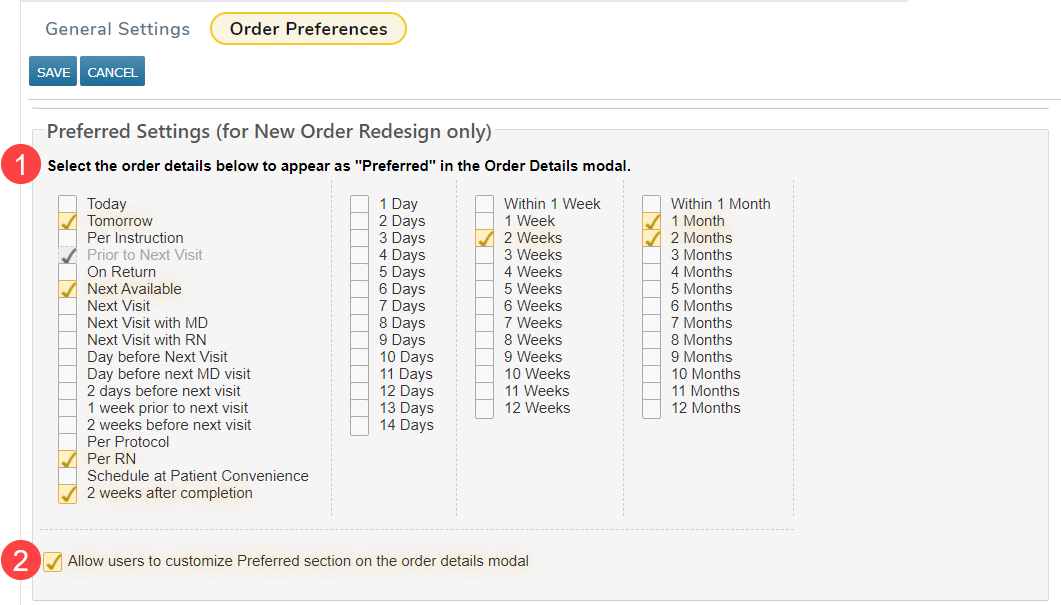
A new section, Preferred Settings (for New Order Redesign only), has been added to practice preferences.
To view and update these settings:
- Navigate to Admin > Practice Preference.
- Select Order Preferences from the top menu.
- In the new Preferred Settings section, choose the order date options you want to be available for all practice users (callout 1).
NOTE: The choices saved for your practice in the Order Settings > Default New Order Date field will be selected by default in this section unless it’s set to Require user to select. For more information about the Default New Order Date, read the release notes.
- These options will be displayed in the Preferred section of the order details window once the redesigned Orders tab is available for your practice.
- To allow practice users to set their preferences, check the box next to Allow users to customize the Preferred section on the order details modal (callout 2).
- Save your changes.
NOTE: Updates in this section do not impact the existing Orders selections.