
Patient SMS Appointment Management FAQ Copied
Where do patient phone numbers come from?
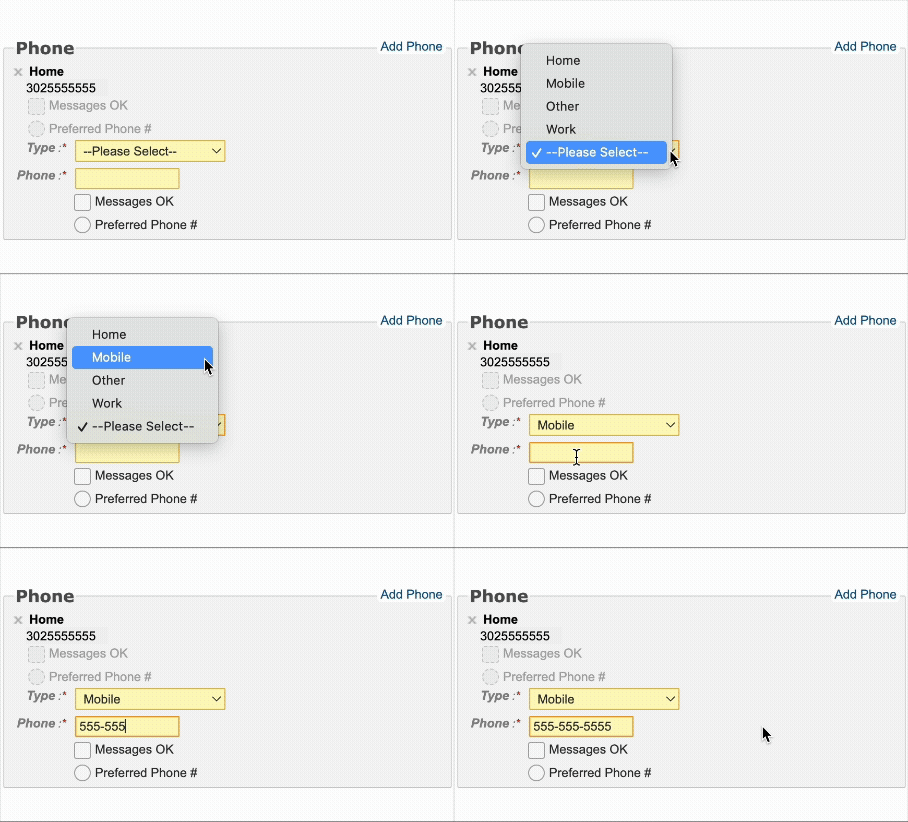
Patient phone numbers are pulled from the information listed in iKnowMed. Ontada Health prioritizes numbers marked as Mobile. For best results, confirm that the patient’s mobile number is entered and labeled correctly as “Mobile” in iKnowMed.
Do appointment SMS messages go out at scheduled times?
The process to send appointment-related SMS messages runs daily at 6:45pm ET. Patients will receive SMS messages 5 days out, 2 days, out and 1 day out from their scheduled appointment.
Can patients see available dates and times when they request a reschedule?
No. When a patient replies to reschedule, the system creates a task in the General Queue. A member of your team will need to contact the patient directly to finalize the new appointment details.
Is SMS appointment management opt-in or opt-out?
We strongly encourage practices have automatic opt-in enabled. Automatic opt-in means patients receive appointment management messages by default and can opt-out at any time. This also means patients without Ontada Health portal access can still manage their appointments via SMS. Let your Ontada Technology Account Manager know if you want to enable automatic opt-in.
Otherwise, patients can opt-in using their Ontada Health patient portal account or practice staff can opt patients in using Ontada Health support tools.
Can practices customize message text?
Currently all text message verbiage is the same for all practices. Practice-customizable text messages may be added in the future.
Is training available for staff?
Yes. Courses include:
- General Queue Management
- Task Management
- Filter Presets
What support is available?
Practice staff can call the Ontada Health support line for technical support. Patients are encouraged to contact their practice for help with appointment management.