
Introducing Bill Pay Copied
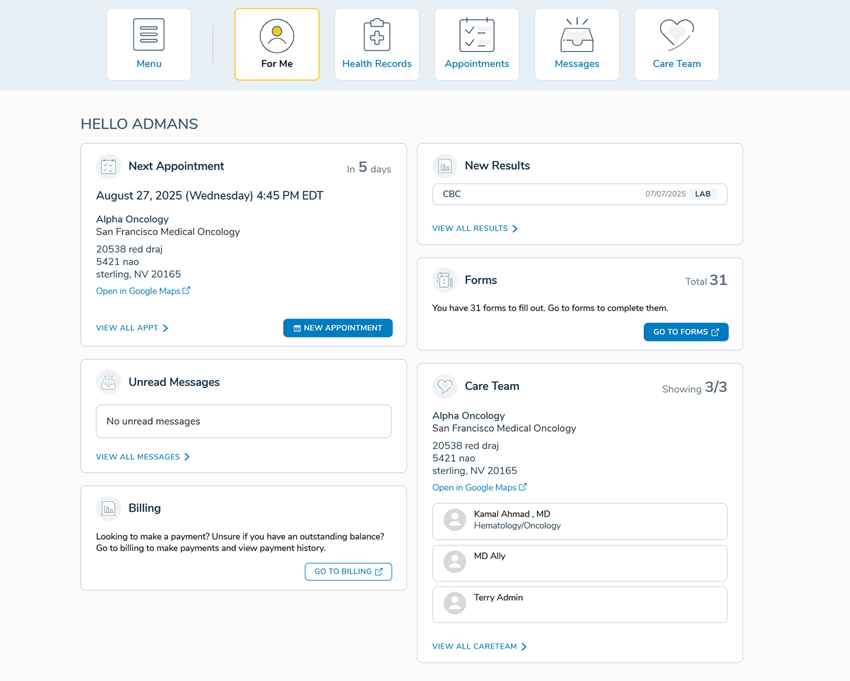
We’re adding a new Billing widget (card) to the For Me page. This widget is designed to help patients quickly see their billing status and access their practice’s bill pay experience.
How it works
The message shown in the Billing widget will dynamically change depending on the information we can retrieve from the practice management system (PMS):
- Generic Message: If billing information cannot be fetched, patients will see a general message advising them to check their balance or make a payment.

- Outstanding Balance (USON AthenaIDX only): If billing information is available and the patient has a balance, the widget will display a message informing them of the balance and prompt them to make a payment.

- No Balance (USON AthenaIDX only): If billing information is available and there is no balance, the widget will display a message letting the patient know they are all caught up. The payment button will still be available in case the patient wants to access their practice’s billing system.

- When clicking the Go To Billing button, patients will be directed to their practice’s unique bill pay functionality. Each practice will have its own specific link configured so patients are always sent to the correct payment portal.
Resources
For more information, access the following resources: