Enhancements in form reminder configuration and tracking Copied
In this release, we are introducing several enhancements to streamline your patient form management process. You now have more control over form reminder settings and improved visibility into the reminders sent. Here’s a breakdown of the new features:
Configure personalized cadence for automatic form reminders
We understand the importance of ensuring your patients complete their required forms on time. You can now work with your Ontada Health account manager to determine when and how often your patients receive these reminders, ensuring your patients are prompted to complete outstanding forms at times that work best for them.
Automatic email reminders based on your preferences
Once you’ve configured the reminder cadence with your account manager, your patients will receive automatic email reminders based on the preferences you’ve set. This proactive approach helps boost patient engagement and ensures timely completion of essential forms.
Track reminder history in the Forms Queue
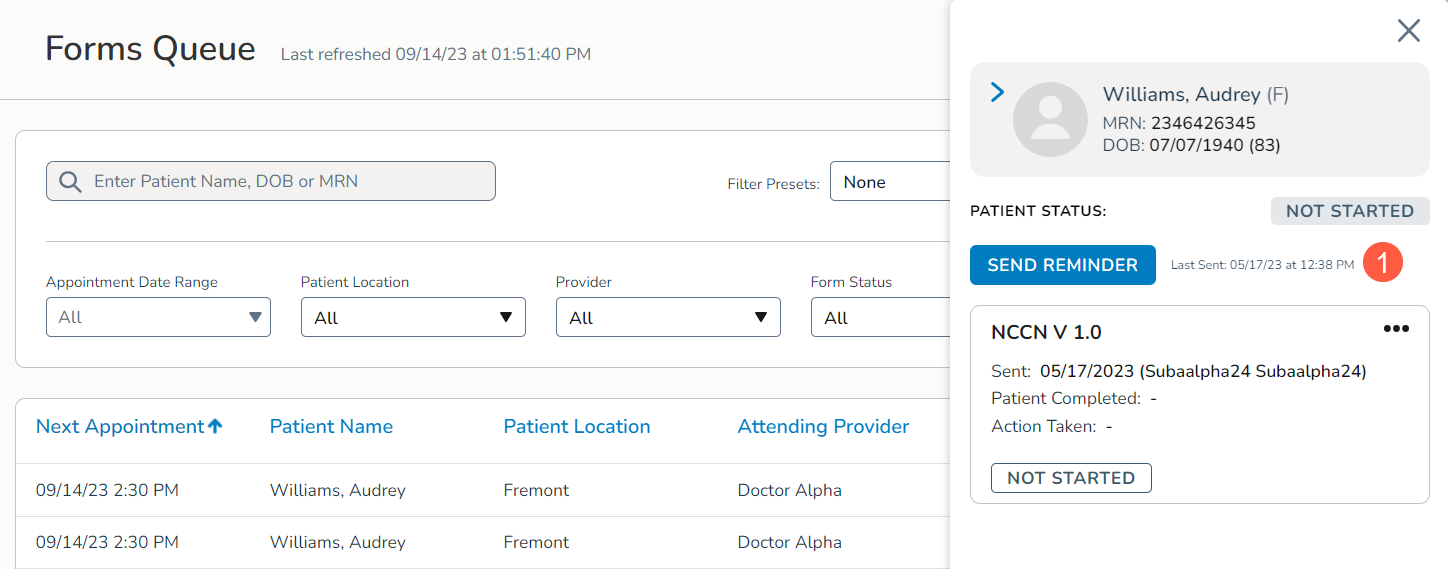
We enhanced the tracking feature to provide you with better insight into your form reminder activities. You can now view the last time a reminder was sent to a patient, whether it was a manual or automatic reminder, directly within the Forms Queue.
When you open an item, you’ll notice the Last Sent timestamp prominently displayed next to the Send Reminder button (callout 1). This timestamp offers a quick reference point to gauge the effectiveness of your reminder strategy and ensures you stay informed about patient interactions.
This enhancement simplifies your workflow, increases patient compliance, and provides valuable insights into your form reminder efforts.