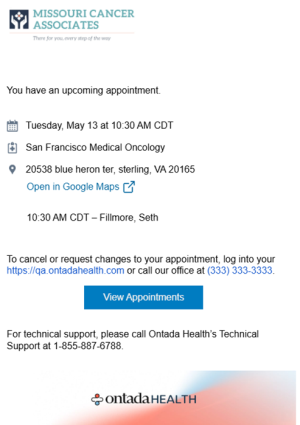
Appointment Reminders Copied
Timely appointment reminders can reduce no-show rates and allow patients to cancel or reschedule in advance. By automating reminders, your staff can spend less time chasing down confirmations and more time participating in meaningful patient engagement.
Appointment reminders overview
With Ontada Health appointment reminders, patients can choose to receive emails that align with their preferences, giving them access to convenient, mobile, and direct appointment information.
NOTE: Appointment reminders are sent to all patients with upcoming appointments, whether or not they are enrolled in the Ontada Health patient portal.
How appointment reminders work
- Enabled by default: Patients will automatically receive appointment reminder emails. If your practice prefers not to send reminders, please contact your Ontada Health Account Manager to have them disabled.
- Covers all upcoming appointments: Emails are sent for every upcoming appointment. If a patient has more than one appointment on the same day, they’ll receive a single email containing all relevant details for that day.
- Reminder schedule: Emails are sent 5 days, 2 days, and 1 day before the appointment date.
Practice control via Support Tools
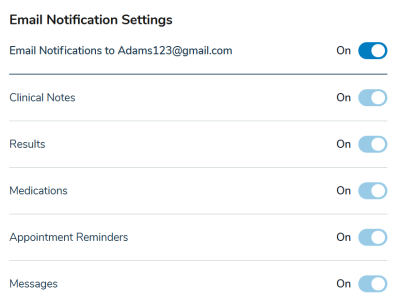
Practices can view and manage patient email preferences using the notification settings available under Support Tools > Patients. Toggle on or off the new Appointment Reminders option under Email Notification Settings to set custom preferences.
Patient control via the portal
Patients also have greater control over their communication preferences.
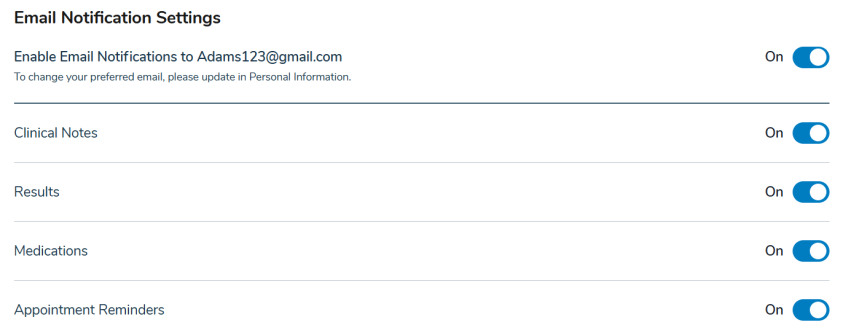
They can view and manage their email preferences using the notification settings available under the My Account > Notification Settings section of the portal. They can toggle on or off the new Appointment Reminders option under Email Notification Settings to set custom preferences.
Clear email reminders
The appointment reminder emails that patients receive have been designed for clarity and brevity, helping patients quickly understand the key details of their upcoming appointment.