Chart Alert to Block Auto-Release Results for At-Risk Patients Copied
This chart alert will hold results from the patient portal, after the upcoming auto-release feature is implemented. Once the auto-release feature is implemented, patients without this chart alert will have their results released automatically to the patient portal.
Practices and providers should determine their policies for exempting a patient and adding this chart alert. Whenever the chart alert is added to the patient, details should be added to document the reason for the patient’s exemption from the 21st Century Cures Act.
Currently, this chart alert does not affect the release of lab results. We have released this chart alert prior to the auto-release feature to allow practices time to determine which patients, if any, should be exempt from the upcoming auto-release feature.
To add this chart alert to a patient:
-
Go to the patient’s Clinical Profile and click on the Chart Alerts tab.
-
Click on the ADD ALERT button.
-
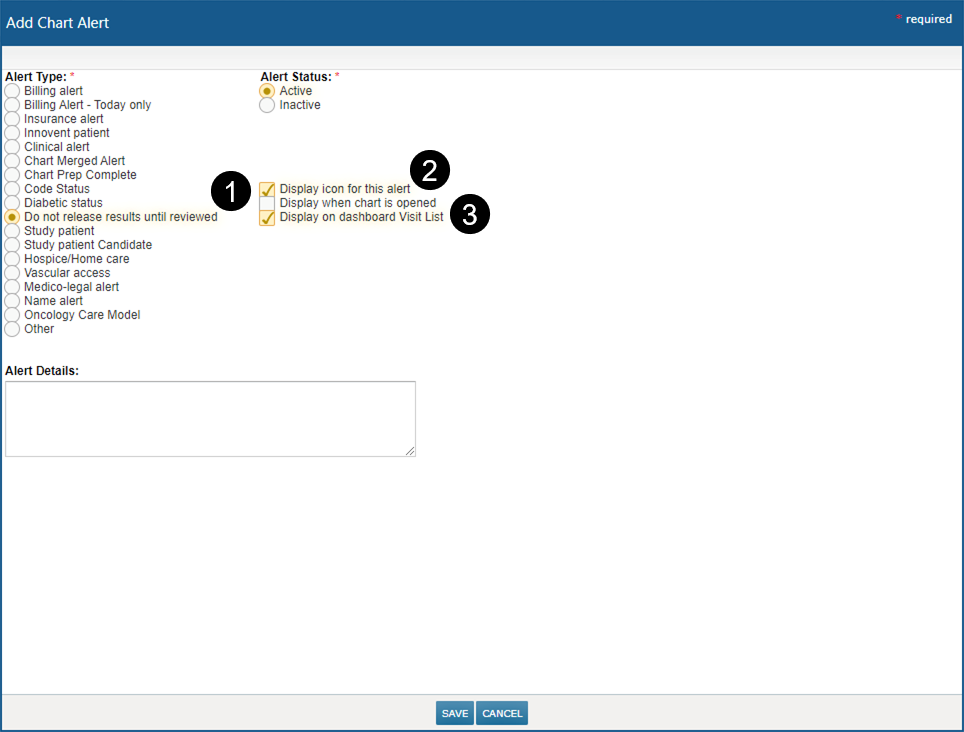
Under the Alert Type, select the new Do not release results until reviewed alert (see callout 1).
-
The options, Display icon for this alert and Display on dashboard Visit List, will automatically be checked (see callouts 2 and 3).
-
SAVE your changes.
-
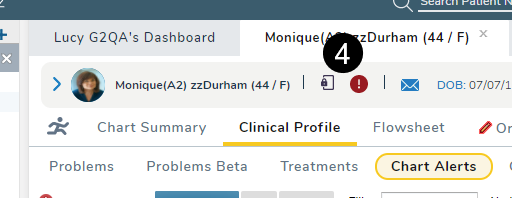
The icon for this alert will appear as a rectangle with a padlock on the patient’s chart and the visit list (see callout 4).