21st Century Cures Act Lab Results Auto-Release Copied
Starting in iKnowMed Generation 2 version 3.0.25, lab results will be automatically released to patient portals to meet the requirements of the 21st Century Cures act. Practices can block the auto-release of labs as necessary to comply with state law requirements for counseling prior to release, or to prevent risk of substantial patient harm.
For more information, continue reading here or visit the Lab Results Auto-Release FAQ.

Blocking Auto-Release of Labs
To block the auto-release of labs, use one of the following features previously released in iKnowMed Generation 2:
-
Flag specific lab tests with the Patient portal Hold until Review preference as introduced in version 3.0.22 to prevent the auto release of these lab results for all patients.
NOTE: To honor your practice preferences for holding lab results that are received from a lab interface, the interfaced result types must be mapped to iKnowMed Generation 2 terms. If your practice uses OLIF this mapping is already done. If your practice does not use OLIF, please consult with your lab manager to assure that the specific result types that you would like to be held are mapped.
-
Add new the chart alert introduced in version 3.0.24 to a patient’s chart to hold only that patient’s lab results from the patient portal.
If either of the two conditions above are met, the lab results will not be released to the patient portal until reviewed by the physician.
Reviewing Labs for Release
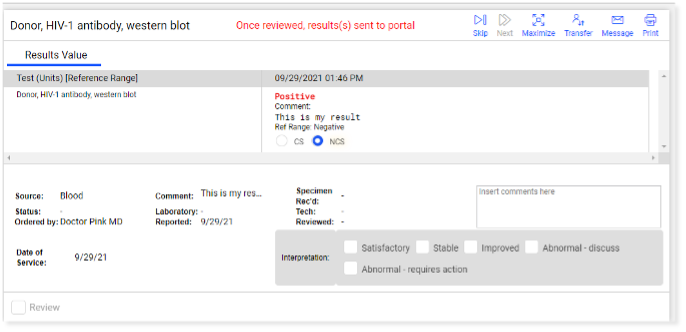
These results will continue to appear in the Unified Sign Queue, as well as in the Lab worklist. What’s new for 3.0.25 is a visual indicator noting results that meet the exceptions and will not be released until reviewed by a physician.
For example, in the Unified Sign Queue, lab results requiring physician review before release will be indicated with the following statement at the top of the results: Once reviewed, result(s) sent to portal (see image below).