Ability to Withhold Sensitive Lab Results as Part of the 21st Century Cures Act Copied
In support of the information blocking provision of the 21st Century Cures Act, in iKnowMed version 3.0.23, all lab results will be automatically released to the patient portals, unless marked as needing physician review prior to release. In preparation for that change, the version 3.0.22 release allows practices to mark the labs that should be withheld from the patient portal until the physician reviews them.
To withhold a type of result:
- Go to Manage > Labs/Imaging & Services.
- Select the type of result that needs to be withheld and click the EDIT button.
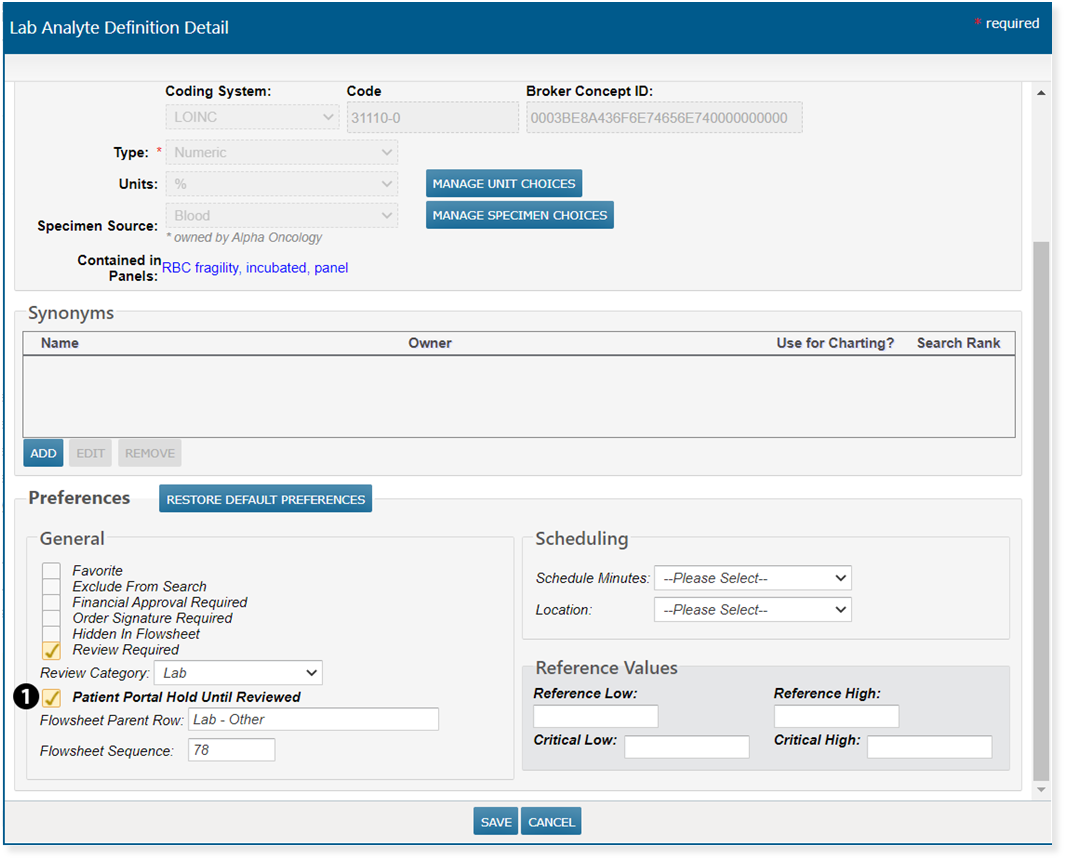
- Under the General section, check the box for Patient Portal Hold Until Reviewed (see callout 1).
- SAVE your changes.
Now when patient results are automatically released in the next version of iKnowMed, these types of results will be held back until the physician conducts a review and releases the results to the patient portal.