
Updated login experience in preparation for Okta integration Copied
We’ve introduced an update to your login experience, paving the way for Okta integration. Here’s what you need to know:
What’s changing?
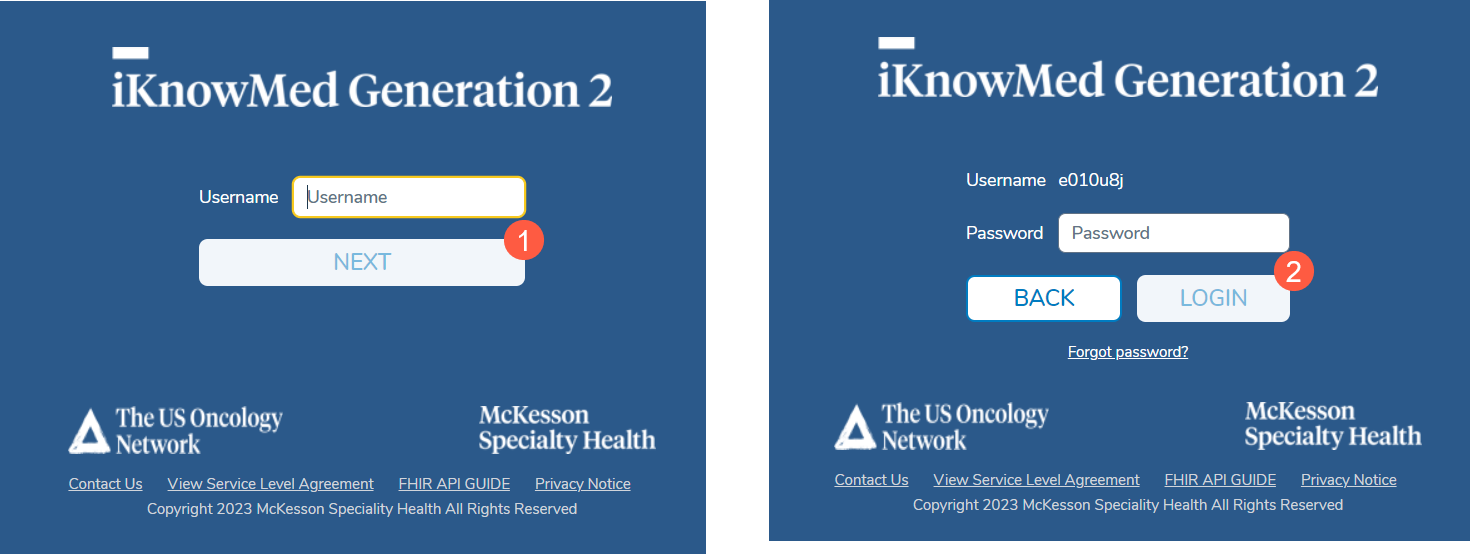
After this release, the iKnowMed login process will now have two steps:
- Enter your username on the first screen and click the Next button (see callout 1).
- Enter your password on the second screen and click the Login button (see callout 2).
NOTE: Your username, password, and login policies will remain the same after this release. Once your practice changes over to Okta, they may change.
Why the change?
While this may seem like a minor inconvenience now, it’s an essential step toward our Okta integration. Okta is an industry-leading identity management service that simplifies how you access Ontada applications.
The Benefits of Okta Integration
- Enhanced Security: Okta’s security measures will fortify the login process, ensuring your data remains safe and sound.
- Faster Sign-In: Once Okta integration is complete, signing in will be quicker and more straightforward than ever before.
The First Step in Integration
The adjustments to the iKnowMed login screen mark the initial phase of this change. After your practice starts using Okta, you’ll enjoy a host of benefits:
- Single Sign-On: Use the same username and password to securely access all your Ontada applications once they onboard Okta services.
- Simplified User Management: Your IT staff will no longer need to create, manage, and map user accounts across various applications.
We understand that change can be challenging, but this upgrade is designed to make your Ontada experience smoother and more secure. Your Account Manager will work with your practice to guide you through this change and answer any questions you may have.