Send notes via Direct Exchange from the Notes Review queue Copied
Users can now easily send notes through direct exchange messaging directly from the Notes Review queue, in addition to the previous option of sending via fax.
This will help streamline the process of sharing reviewed notes with external providers and reduce the need for manual selection of sending methods, improving communication workflows.
Direct exchange requirements
The system will automatically select direct exchange as the send method if the following conditions are met (otherwise, it will default to fax):
- The practice has enabled Direct Exchange Messaging by checking the “Allow to Send Documents” box under Practice Preferences > External Provider Direct Exchange Messaging Configuration.
- The external provider is set up in Admin > External Providers with a valid direct exchange address.
- The send method aligns with the Preferred Contact Method for the external provider:
- If Direct Message is selected as the provider’s Preferred Contact Method, the note will be sent via direct exchange.
- If Fax is chosen, the note will be sent via fax, even if the provider has a direct exchange address.
- If the Preferred Contact Method is unknown, the system will default to direct exchange.
NOTE: To ensure successful delivery, it is recommended to set the external provider’s Preferred Contact Method to either Direct Message or Fax. This can help ensure the notes are delivered as expected.
Signing button updates
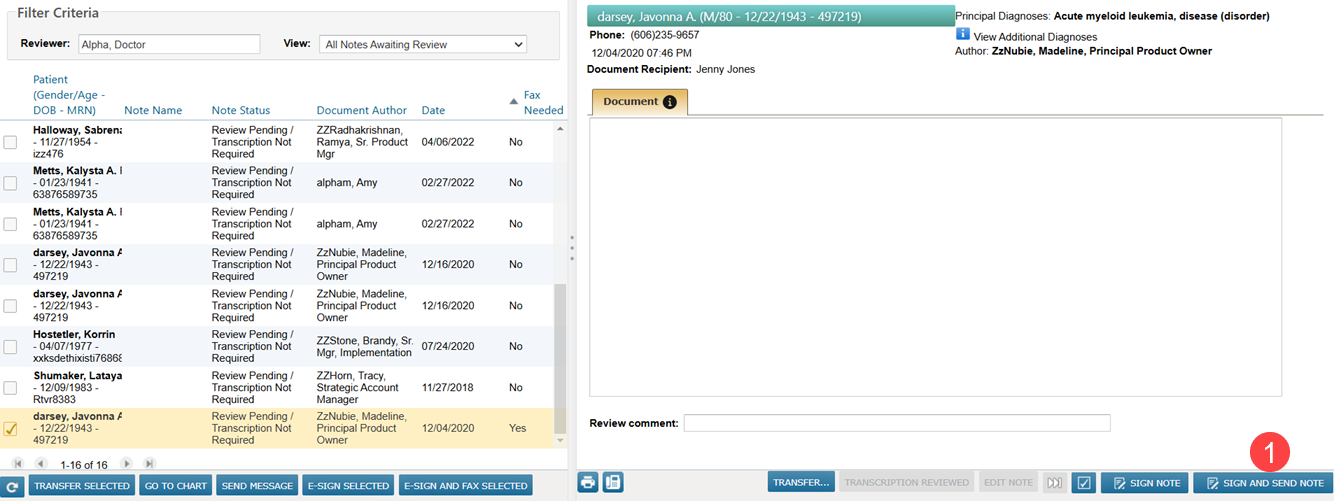
- New Button Label: The action button has been retitled from “SIGN AND FAX” to “SIGN AND SEND” (callout 1) to indicate that users now have the flexibility to send the note via fax or direct exchange, depending on the provider’s contact preferences.
- Dynamic Button Activation: The SIGN AND SEND button activates once recipients are selected for the note. If no recipients are chosen, the button remains grayed out and unclickable.
- PIN Entry and Note Status: Upon clicking the SIGN AND SEND button, the user will be prompted to enter their PIN. After PIN entry, the note will be signed, sent to the selected recipients, and marked as reviewed.