Restricted Patient Charts Copied
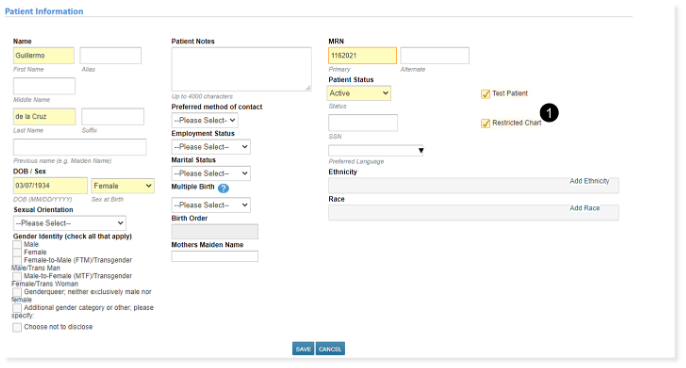
A new Restricted Chart designation has been added to patient Demographics to signify that the patient should only be accessed by authorized personnel (see callout 1).
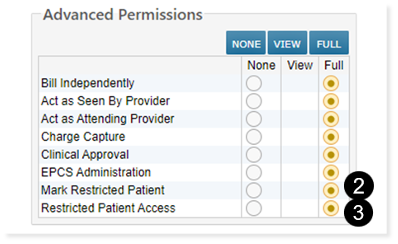
Users must have the new Mark Restricted Patient permission and existing Demographics permission to mark or unmark a patient as restricted (see callout 2).
To view restricted patient charts, users must have new Restricted Patient Access permission (see callout 3).
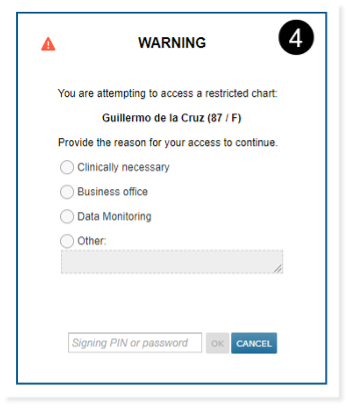
When accessing restricted patient charts, users with the Restricted Patient Access permission must enter a reason for accessing the patient, as well as their current pin or password (see callout 4).
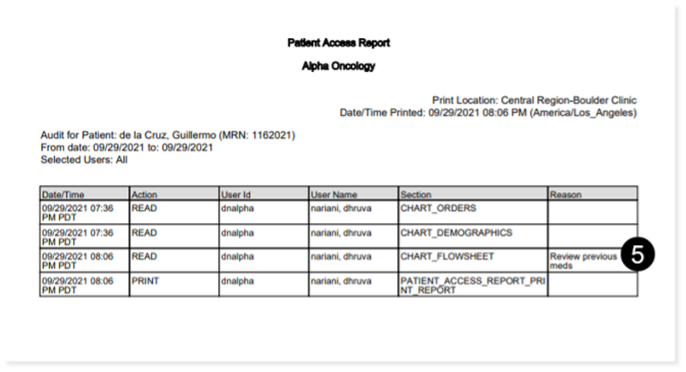
The Reason for accessing the patient will be logged and accessible via Flowsheet > Patient Access report or Admin > Users > User Audit Report (see callout 5).
NOTE: Users without either of these permissions will not be able to access restricted patient charts but can still see relevant patient information in their worklist queues.
NOTE: This feature is only available via the desktop application at this time. It will be available for iKnowMed Mobile in a future release.