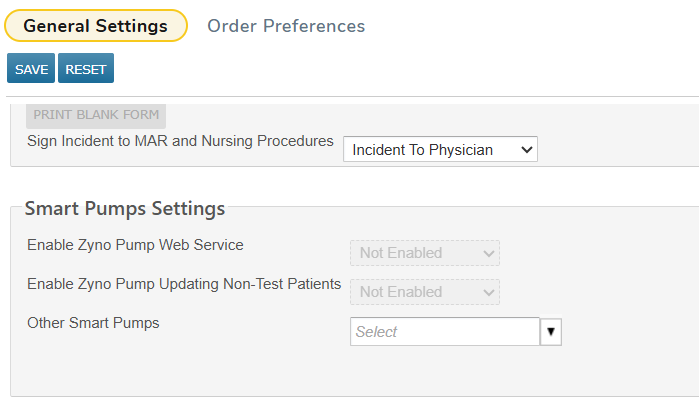
Practice preferences in advance of smart pump integration Copied
In a future release, we will be introducing a new smart pump integration to automate and streamline in-office infusion treatments. Although this feature is not yet live, you will see the practice preferences in advance to prepare for the upcoming rollout. These settings are disabled and will not activate the smart pump integration until the feature is enabled during a future release.
What’s changing now
A new Smart Pumps Settings section will be available in the Practice Preferences area. These preferences will allow your practice to set up the foundation for smart pump integration, including support for Zyno infusion pumps and other brands.
NOTE: These settings are disabled and will not affect current workflows until the integration is activated in a future release.
How the practice preferences work
- Navigate to Admin > Practice Preference.
- Scroll to the new Smart Pumps Settings section.
- Enable one or more of the following options:
- Enable Zyno Pump Web Service: Activates the connection between iKnowMed and Zyno pumps to control treatments via the EHR.
- Enable Zyno Pump Updating Non-Test Patients: Allows your practice to apply pump integration to real (non-test) patients when the feature goes live.
- Other Smart Pumps: Use this option if your practice uses infusion pumps from a different manufacturer.