Practice Preference to Support Using AMA Time on Billing Screen Copied
Prior to the current release, New Patient and Established Patient E/M codes used CMS time and CMS prolonged code G2212. To allow practices and their revenue cycle teams the option to use AMA time, we added a Practice Preference that allows the billing screen to display different time values in the code descriptions and drop downs.
NOTE: iKnowMed defaults to CMS time, so after this release you will not see any changes to the screens or codes unless you turn on the preference for AMA time.
To turn on the preference:
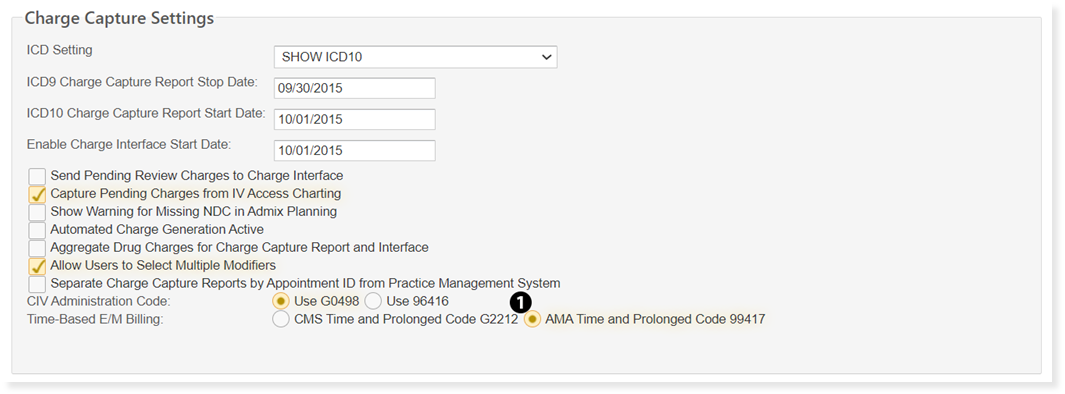
- Go to Admin > Practice Preferences.
- Under the Charge Capture Settings section, choose the AMA Time and Prolonged Code 99417 option from the Time-Based E/M Billing setting (see callout 1).
- SAVE your changes.
This preference has a backwards compatibility that ignores the preference when the appointment already has a prolonged code from the opposite setting associated with it. If your practice chooses to toggle this setting from CMS to AMA time or vice versa, any prolonged codes that are already associated with the appointment will remain.
This means when the user opens the Billing Code Selection screen, if a prolonged code has been selected prior to changing the practice preference, the screen will ignore the practice preference and display the codes and descriptions for the code set corresponding to code set associated with the prolonged code. For example:
- Patient A already has a 99215 and 1 unit of G2212 charted for their visit. G2212 corresponds to CMS time.
- Patient B has a 99205 charted for their visit but no prolonged code. 99205 is used in both AMA time and CMS time.
- If the practice preference is toggled to use AMA time and a user goes back to the billing screen to review what was charted, Patient A will still show CMS time because a prolonged code in CMS units was already selected and the system will ignore the practice preference to preserve previously charted codes. Patient B does not have a prolonged code and the screen will honor the change in the practice preference and AMA time will now be displayed on the screen next to the already selected 99205 code.