
Orders Queue Enhancements Copied
We’re making several improvements to the Orders Queue to streamline performance, improve reliability, and reduce workflow disruptions.
Retirement of the Orders Queue Legacy
To optimize overall system performance, we’re removing the Orders Queue Legacy. This eliminates the need for background processes that maintained two queues, reducing system delays and potential disruptions.
NOTE: Users can continue to leverage the filter for the Orders Queue Legacy “Processed” status in Orders Queue > Filters > Queue Status.
Smarter order status handling
We’ve refined the rules that determine when an order’s status resets in the Orders Queue to help preserve accurate order status tracking and minimize unnecessary rework.
Going forward:
- Editing C1s from the patient’s Flowsheet or Order History tab will no longer reset an order’s queue statuses to “Not Started”.
- Opening an order from the Flowsheet or Order History tab and clicking Save & Sign without making any changes will no longer reset the order’s queue statuses to “Not Started”.
See the number of patients, not orders
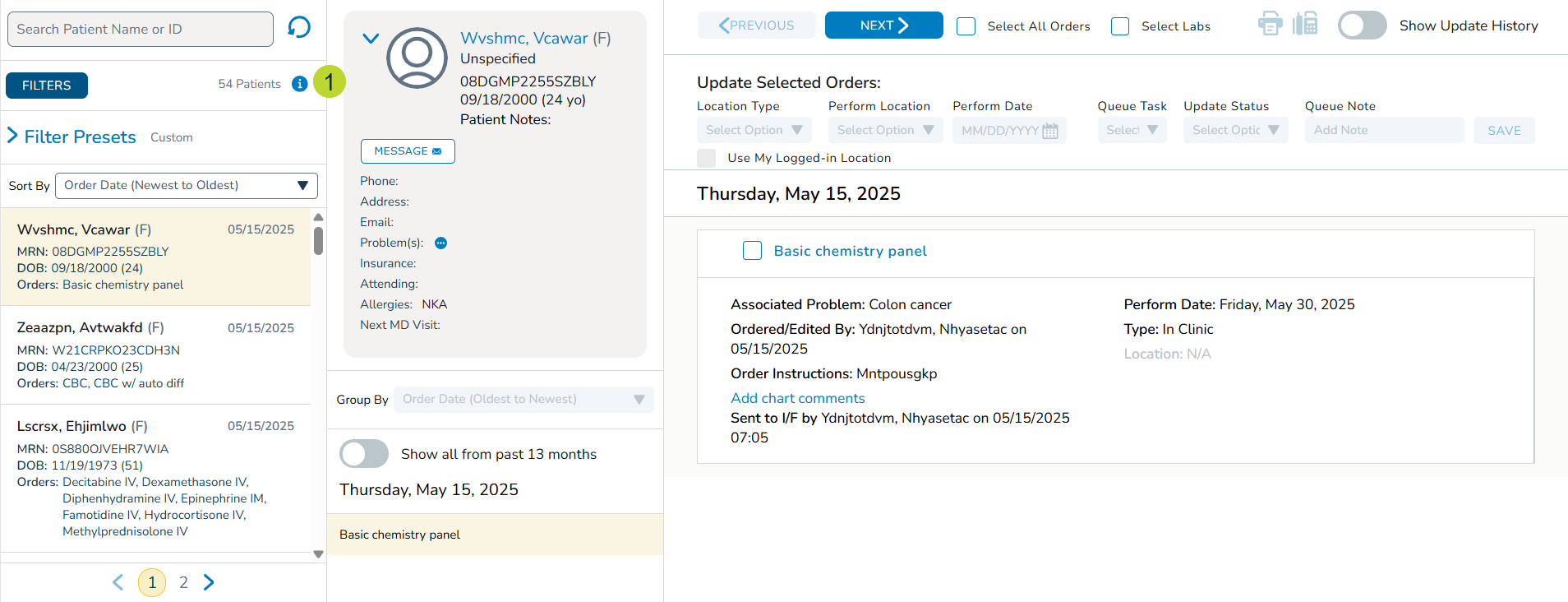
You’ll now see the number of patients (instead of the number of orders) that match your current filter criteria displayed in the far-left column of the Orders Queue (callout 1). This change boosts queue performance, as retrieving the patient count is much faster than counting individual orders.
More reliable order display
We’ve improved a background process to more efficiently apply the default “Not Started” status to orders. This reduces the chance of orders being missing from the queue, especially during times of high system activity. You’ll now see orders appear in the queue more consistently, as expected.