
Order Sets: Bulk management for non-medication orders Copied
Practice administrators can add, remove, or replace non-medication items across multiple order panels or order sets in a single action.
What’s new
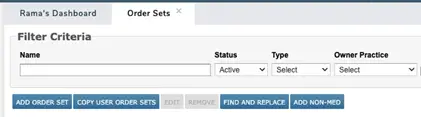
- Bulk remove or replace: Update non-medication orders across order panels or order sets directly from the existing management screen
- Bulk add: Use the new “ADD NON-MED” button to add a non-medication order to multiple order panels or order sets at once
Why this matters
These tools eliminate repetitive manual edits when managing non-medication orders at scale. You’ll maintain consistency across order sets more efficiently and reduce the risk of missed or inconsistently applied orders.
For more information, visit the Help site.