
New Regimen Orders Report Copied
Users with Administration, Clinical, Clinical Support Solution, Nursing, and Pharmacy permissions can now access the Regimen Orders Report. This report streamlines the process of tracking regimen treatment orders for patients, providing detailed insights into medication and cycle information.
With this report, users can easily identify new regimens starting on C1D1. Additionally, users can review regimen orders for existing treatments, regardless of the order date, assisting in care management.
Lastly, this report enhances patient safety by enabling the identification of shortages. Users can quickly pinpoint patients receiving specific medications to proactively manage inventory and ensure uninterrupted treatment delivery.
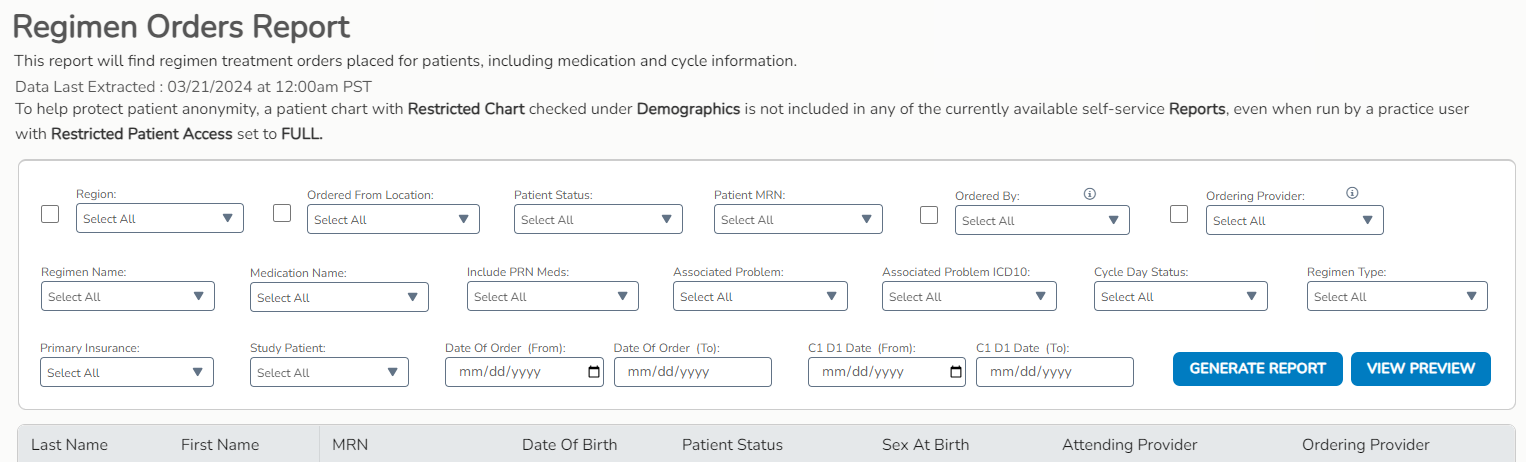
Report Filters
The Regimen Orders Report can be filtered to segment and analyze regimen orders by geographic location, status of patients, MRN, ordering provider, specific regimens and medications, and more.
Here is the complete list of available filters:
- Region (if applicable)
- Ordered From Location
- Patient Status
- Patient MRN
- Ordered By
- Ordering Provider
- Regimen Name
- Medication Name
- Include PRN Meds
- Associated Problem
- Associated Problem ICD10
- Cycle Day Status
- Regimen Type
- Primary Insurance
- Study Patient
- Date of Order (From and To)
- C1D1 Date (From and To)