
New palliative care chart alert provides visibility into patients receiving palliative care services Copied
We’ve introduced a new palliative care chart alert that allows users to see which patients are receiving palliative care services. The alert will also assist practices with reporting by providing an exclusion for palliative care patients in the appropriate value-based care quality measures (MIPS 236 and MIPS 238).
To add this alert to a patient chart:
-
Go to the patient’s Clinical Profile.
-
Select the Chart Alerts page.
-
Click the ADD ALERT button.
-
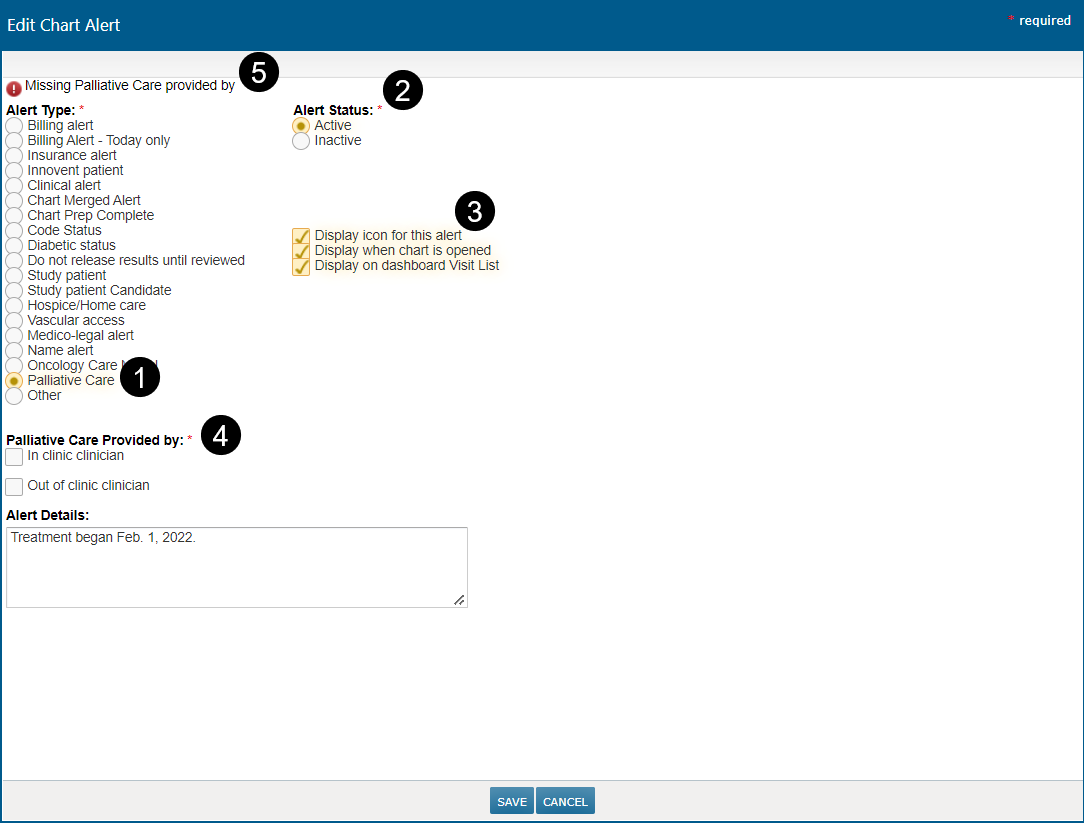
In the Add Chart Alert window, select the new Palliative Care alert type (see callout 1).
-
By default, the alert is active, and all three display options are turned on (see callouts 2 and 3). Amend these settings as needed.
-
Choose if this care is provided on-site, off-site, or both in the Palliative Care Provided by required field (see callout 4).
-
If this field is not completed when saving the alert, an error message will appear at the top of the window prompting you to make a selection (see callout 5).
-
Enter any additional Alert Details if needed.
-
Save your changes.
This alert will now display in all selected locations as a hand and heart icon (see callout 6 for example) to denote when a patient is receiving palliative care.
