Improved appointment management with Visit List and PMS integration Copied
An enhancement to the way iKnowMed handles appointments in the Visit List, improving workflow and providing more flexibility in managing patient appointments, will be rolled out to practices not currently taking advantage of this functionality:
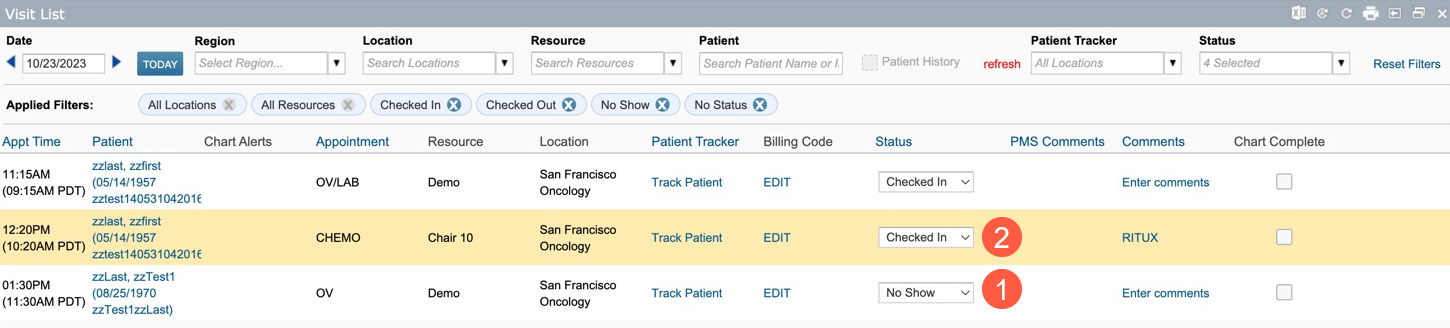
- No Show Status Integration: iKnowMed now seamlessly integrates with your PMS to accept and display a No Show status in the Visit List (callout 1). This means that iKnowMed will no longer automatically cancel appointments when a patient is marked as a No Show, allowing you to retain the appointment information and making it easier to reschedule or take appropriate action without any data loss.
- Automated Checked In Status: When your PMS sends a checked in or arrived status, iKnowMed will now automatically select and display the Checked In status in the Visit List (callout 2), streamlining the patient check-in process and ensuring the Visit List is always up to date.
If you are not seeing status updates from your PMS, even though you check in and/or no show patients as part of your workflow, you may need to reach out to ensure this is a functionality that your PMS supports. If your practice prefers not to use these new features, please contact your Account Manager to have it turned off.