
iKnowMed Mobile 2.4.0 Copied
iKnowMed Mobile version 2.4 introduces great new functionality with particular attention given to Messaging on Apple Watch. Additionally, we’ve added Handoff capabilities across all compatible Apple devices and Siri Shortcuts for tailored workflows.
What’s New
Apple Watch
-
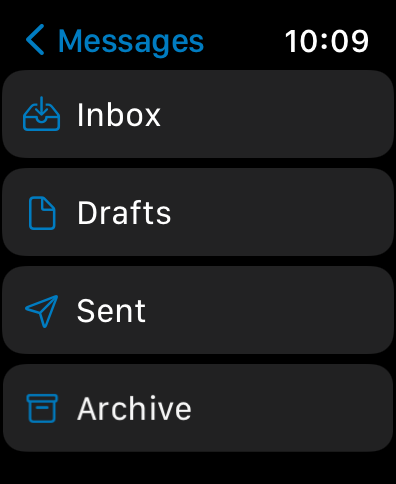
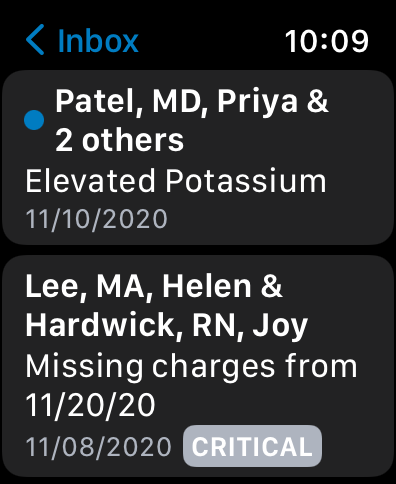
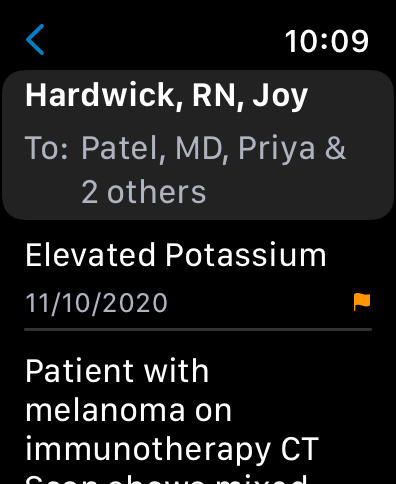
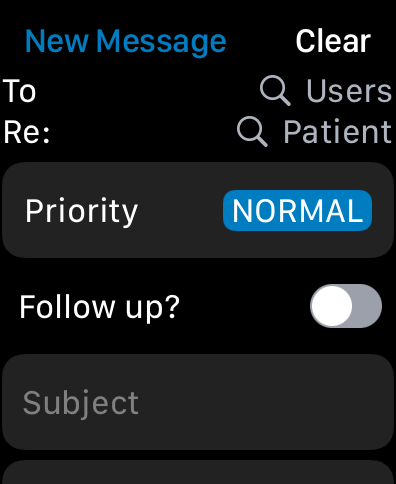
This release introduces great new Messages features that make the Apple Watch a great option for messaging other iKnowMed users. These features include:
-
Send and Receive messages from individuals and groups
-
View messages across all your folders
-
Save a message draft composed on Apple Watch to complete and send later using an iPhone, iPad, or computer.
-
Messages containing HTML content can be viewed on another device using Handoff
-
Usage Tips
-
Support options like Submit a Ticket, Contact Us, and Write a Review have now been moved to the Usage Tips section of the app. They will no longer appear in the More section.
-
Collect Diagnostics will now be disabled by default. Users will be given instructions to share diagnostic information from our support team, should they be needed to troubleshoot an issue.
-
Usage tips for all supported Apple devices may now be viewed from any device. For example, users can now view iPad and Apple Watch usage tips from an iPhone, or Apple Watch usage tips from an iPad.
-
Write a Review has been added under the Usage Tips section, allowing users to easily leave App Store reviews for the iKnowMed Mobile app. Your feedback greatly appreciated!
Handoff
-
iKnowMed Mobile now supports handoff functionality for Messages and Demographics. For example, this allows users to begin composing a message on their Apple Watch or iPhone, and continue this task on their nearby iPad. Alternatively, users may view a patient chart on their iPad and use handoff to quickly bring that patient chart up on their iPhone or Apple Watch to contact the patient.
Shortcuts
-
Users can now add Siri Shortcuts for Next Visit and Patient Search, providing quick access to this information across their devices.
Bug Fixes
-
Apple Watch Sign In UI has been optimized for a clearer viewing experience.
-
Caller ID Warning now works as expected and is respected in the Pharmacy Information set in Demographics.
-
An issue causing unexpected content panel behavior on iPad while in portrait mode has been resolved.
Known Issues
-
User Search and Patient Search on Apple Watch are limited to the first 25 results.
-
Viewing and editing message drafts on Apple Watch will be introduced in a future release.