
Group Charges by Appointment ID Copied
iKnowMed Generation 2 has logic in place that groups charges onto one charge capture report with one appointment ID when the following items for the charge are the same:
-
Date of the Appointment
-
Location
-
Attending Provider
-
Seen By Provider
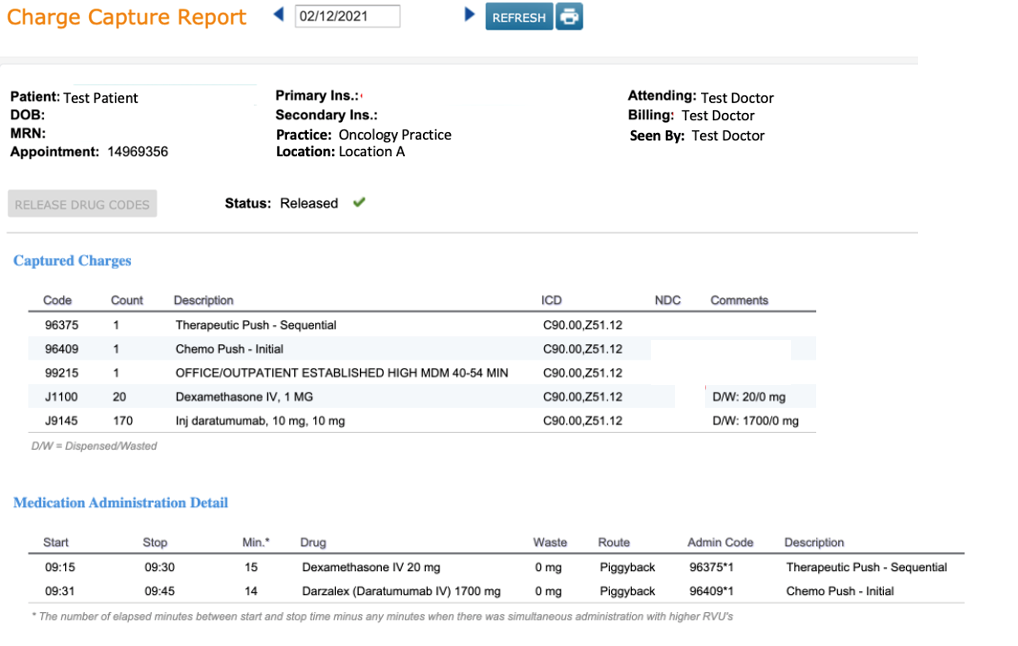
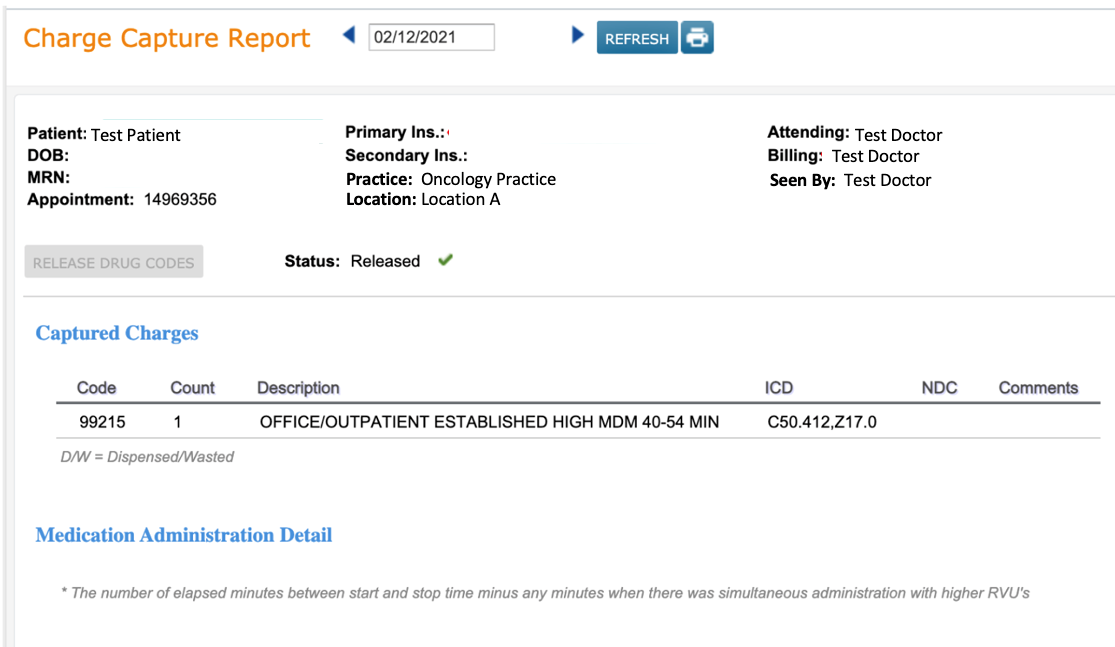
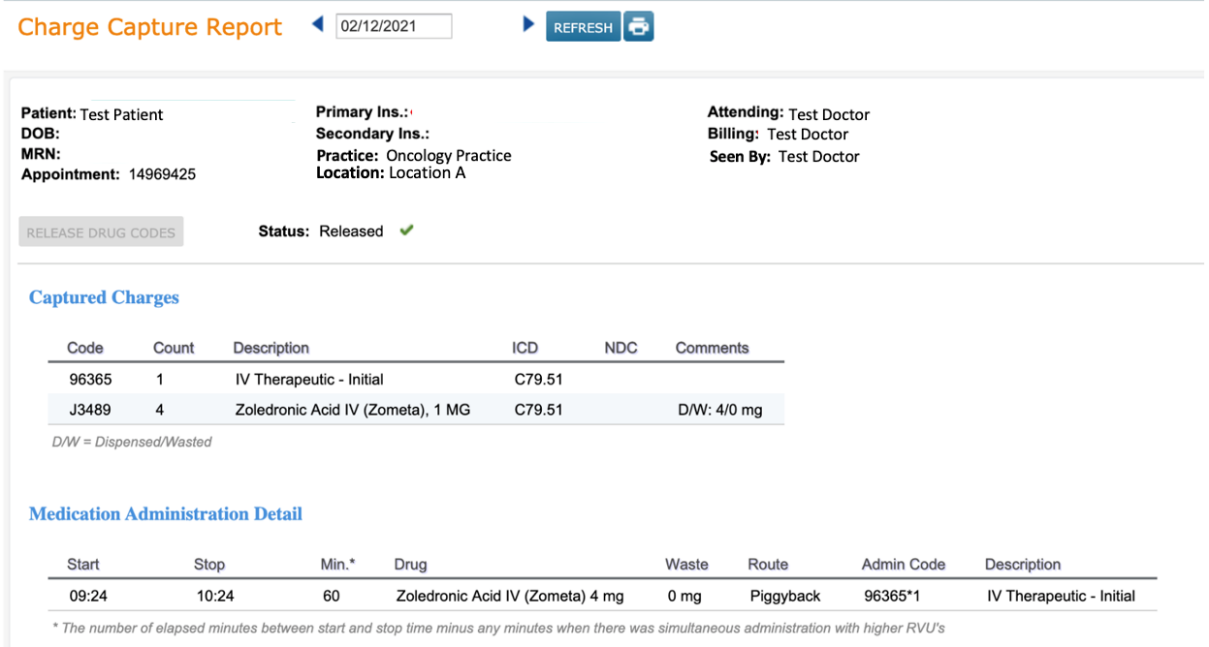
This grouping of charges means that some individual appointment charges are combined with other appointment charges and both appointments receive the same appointment ID on the charge capture report. A common example of this is when a patient has an E/M appointment and an infusion appointment at the same location on the same day with the same Attending and Seen By Provider.
The combining of more than one appointment charges under a single appointment ID can cause additional manual work in the Practice Management System (PMS).
In this release, we created the option to group charges by Appointment ID. Practices who have not reported an issue with the way charges are grouped today will likely not need to utilize this new feature.
Your practice may not be experiencing any additional work because of the way appointments are set up such that the Location, Attending, and Seen By are not the same. Or, you may see charges combined on the Charge Capture Report, but based on the storage of appointment IDs by our charge interface partner, when the charges are consumed by the PMS, the correct Appointment IDs are applied and the charges do not need to be manually associated to the correct appointment.
For practices that are experiencing additional work to manually associate the charges in the PMS, we have created a Practice Preference to group charges by the associated Appointment ID instead of by common Date, Location, Attending Provider, and Seen By Provider.
See example below of an E/M appointment and an infusion appointment bundled on the same Charge Capture Report when the Practice Preference is turned off.
See example below of an E/M appointment and an infusion appointment with the same Date, Location, Attending, and Seen By that has two separate charge capture reports each with its respective Appointment ID. This is how charges are generated when the Practice Preference is turned on.
It is important to understand that this Practice Preference should not be turned on without coordination between your organization, Ontada, and your PMS vendor. Each PMS is different and requires additional setup and monitoring to accommodate the change in the way charges are received.
Recommended Usage
-
This feature is only intended for practices that have a scheduling interface which supplies appointment IDs and a charge interface which transmit charges to a practice management system. This feature was not designed for practices using the scheduler inside of iKnowMed.
-
This feature is only intended for practices that book separate appointments for each provider the patient is seeing and separate appointments for treatment and provider visits. If your practice has a workflow that adds multiple rendering providers onto one visit or wants to continue having all charges for multiple appointments appear on one charge capture report for printing, we do not recommend using this feature.
-
We do not recommend turning this feature on and then off again as charges will not be retroactively bundled. Charges are generated in real time and reflect the status of the practice preference at the time the charge was generated.
How to Utilize This Feature
-
Reach out to your Account Manager so that they can facilitate conversations with the Ontada interface team.
-
Reach out to your PMS vendor to let them know you will be turning on this feature. It is recommended that you include your Account Manager in this conversation.
-
Once your Account Manager and PMS vendor confirm this feature can be turned on, proceed to the next steps.
-
Go to Practice Preference > Charge Capture Settings and locate the Separate Charge Capture Reports by Appointment ID from Practice Management System option.
-
The checkbox is defaulted to unchecked. You must check the box to turn it on.