Flexible faxing options for clinical notes using Copy Forward Recipients Copied
Users will have greater control and efficiency in managing note recipients and faxing clinical notes for clinical notes which use the Copy Forward Recipients option.
Key updates
- When faxing notes, users can add additional recipients without automatically including them in the note recipients list.
- Users also have the option to add these additional recipients to the note recipients list if desired.
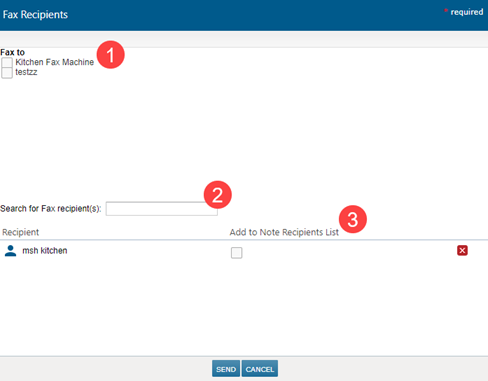
- After clicking the fax icon, users will see an updated Fax Recipients window.
- The “Fax To” list at the top will include the recipients already listed on the note. You can choose to resend to this list if needed (callout 1).
- At the bottom, users will have the option to search for and add additional recipients (callout 2).
- There will also be a new Add to Notes Recipients List option (callout 3) that works as follows:
- If the box is checked, these recipients will be added to the fax and the note’s recipient list going forward.
- If the box is unchecked, these recipients will receive the note via fax without being added to the note’s recipients list.
NOTE: Adding recipients to the fax will not add them to the patient’s Demographics > Providers > External Providers list.