First steps towards iKnowMed interoperability Copied
Interoperability facilitates organized and effective data exchange between health information systems. The ability to share the most up-to-date patient medical records, regardless of the health system, not only reduces costs but also improves patient care and enhances patient outcomes.
In the July 2022 release, we are introducing the first steps towards iKnowMed interoperability using the Carequality framework. Carequality enables nationwide care coordination by giving your practice the ability to communicate electronically and seamlessly with your community partners.
Getting started
The first step to preparing your practice for participation in the Carequality framework is to sign the Carequality service agreement in iKnowMed.
NOTE: This agreement may only be signed by one individual at your practice, and the agreement may only be signed once. Signing the agreement automatically starts to onboard your practice for enrollment in Carequality.
Your Ontada Account Manager will reach out to help your practice sign the agreement and begin the onboarding process.
Opting patients in and out of the Carequality network
After your practice is successfully enrolled in the Carequality network by our engineering team, you may begin to discuss with patients or their personal representatives if they agree to participate in the network.
Your patients may all be enrolled in the Carequality network depending on your state’s laws. Regardless of those laws, you may manually opt patients in and out of the network based on their preferences.
To manually opt patients in and out of the network:
- In the patient’s chart, go to Demographics.
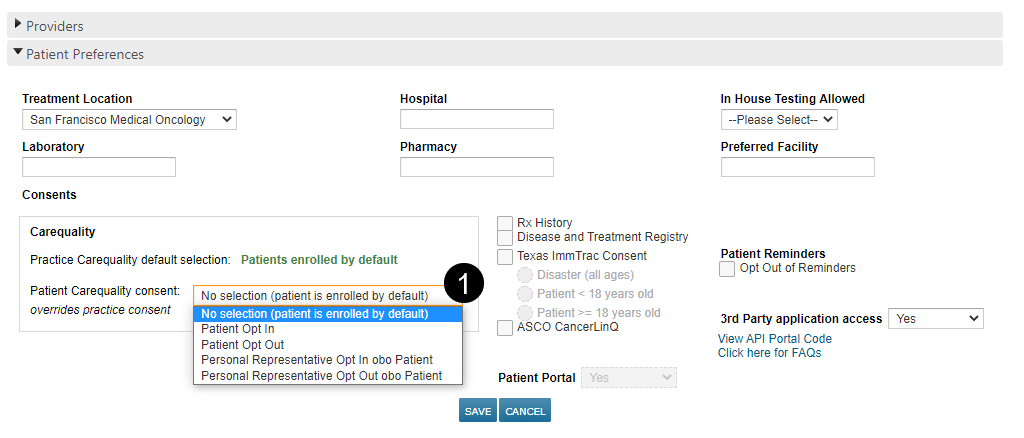
- Under Patient Preferences, there is a new Carequality consent section.
- You may edit this permission to opt the patient in or out based on their preference or based on the preference of their personal representative (see callout 1).
- Be sure to save your changes.