Find orders from custom groups more easily in the new Orders Queue Copied
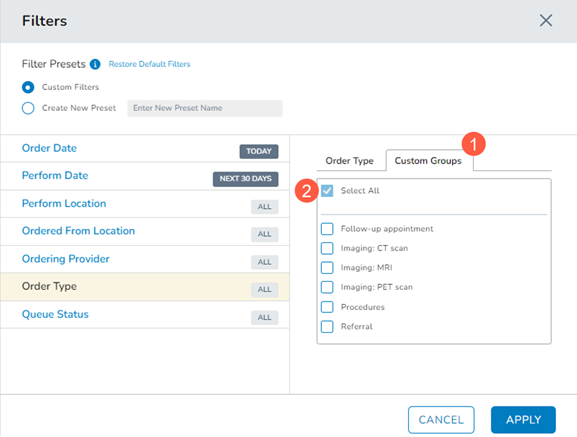
Filters in the new Orders Queue have been updated to move the Advanced Filters option to the Order Type section with the new name of Custom Groups (callout 1).
By default, the Select All option (callout 2) will be selected so that the queue displays all order types and all custom groups.
How to locate orders by type
- To find orders for a particular order type, check the corresponding box on the Order Type tab, such as Prescriptions.
- To find orders for a particular custom group, check the corresponding box on the Custom Groups tab, such as Referral Custom Group.
- To find orders for a particular order type as well as orders in a particular custom group, select the desired items on both tabs. For example, check the corresponding boxes for both Prescriptions and Referral Custom Group.
- The system does not support finding orders in a Custom Group that are also a certain order type. For example, the system will not allow you to find Prescriptions only in the Referral Custom Group.