Enhancements to Task & Time Management Copied
We’re introducing several enhancements to the Task & Time Management feature to provide users with more detailed tracking capabilities and ensure that the enrollment process is efficient and accurate.
Key updates
- Addition of new programs:
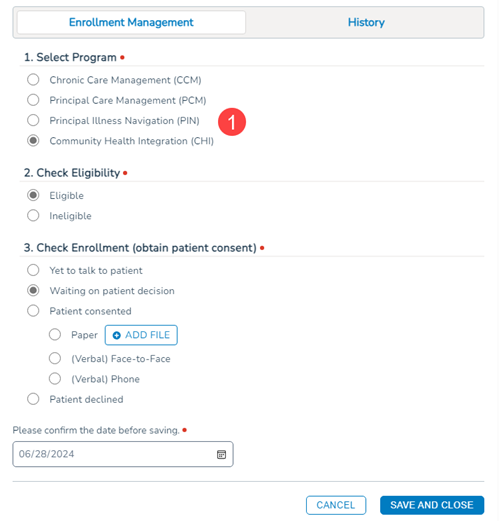
- Two new programs, Principal Illness Navigation (PIN) and Community Health Integration (CHI), will be added to the feature (callout 1).
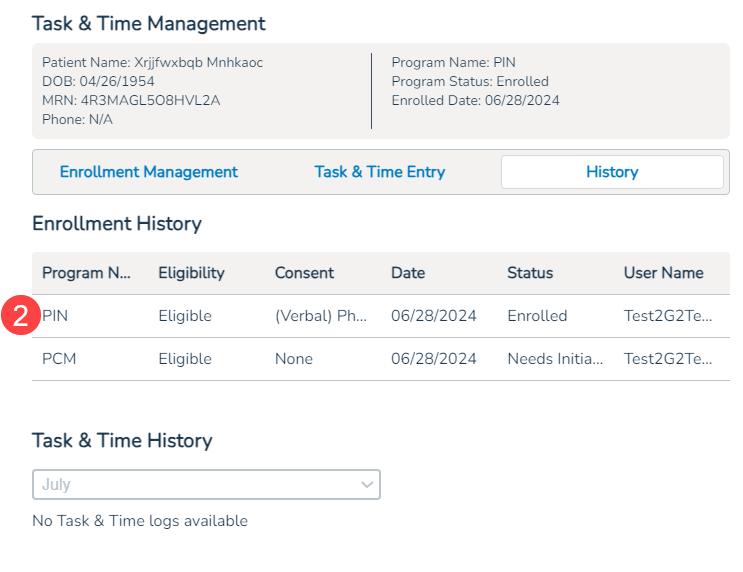
- The History section of the feature and the Task & Time will also be updated to include these new programs, allowing for comprehensive tracking of all program-related changes for each patient (callouts 2 and 3).

- Two new programs, Principal Illness Navigation (PIN) and Community Health Integration (CHI), will be added to the feature (callout 1).
- New step in the enrollment process:
- An additional step called Initiation Visit Completed will appear when users select a Patient consented option during enrollment (callout 4).
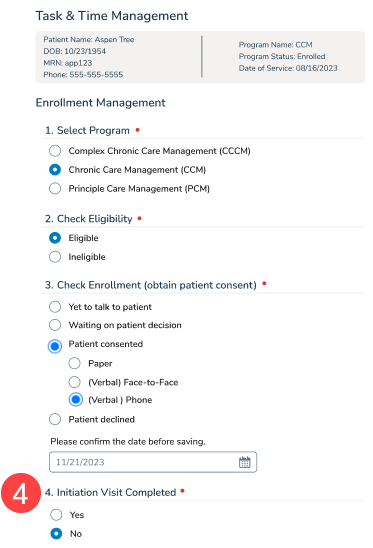
- When “Yes” is selected, the patient will be enrolled, and the enrolled icon will appear in the patient banner.
- When “No” is selected, a new icon will appear in the patient banner indicating that the patient “Needs an Initiation Visit” (callout 5).

- Users can update this status to “Yes” in the feature once the initiation visit has been conducted.
NOTE: Completing the “Initiation Visit Completed” step is mandatory for task and time documentation to be available. Patients must be considered enrolled for this documentation to be accessible.
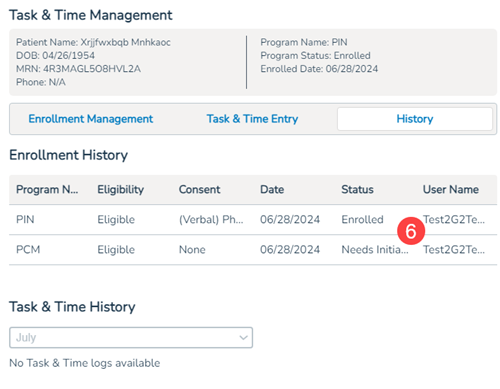
- The History section of the feature and the Task & Time Report will also be updated to include the initiation visit statuses, helping track all changes made to tasks and times for each patient (callouts 6 and 7).