Cures Act update: enable the release of signed clinical notes to patient portals Copied
The 21st Century Cures Act requires EHRs to enable the release of signed clinical notes to patient portals. Last year, we shared instructions detailing how to manually download clinical notes from iKnowMed and upload them into your patient portal.
This release includes functionality and preferences to enable the release of signed clinical notes to patient portals from iKnowMed.
Practices using My Care Plus and Navigating Care will be informed as soon as each portal is able to accept signed clinical notes from iKnowMed.
Starting in January 2022, your practice was able to begin determining which clinical note template types would be sent to patient portals once the notes were signed.
The next step, enabling the Release to Patient Portal practice preference, is now available (Super User access required). Your practice’s patient portal plays a role in when you should enable it.
Getting Started
Signed clinical notes will not be released to the patient portals unless a practice Super User enables this setting in Practice Preferences.
To turn on this setting:
- Go to Admin > Practice Preferences.
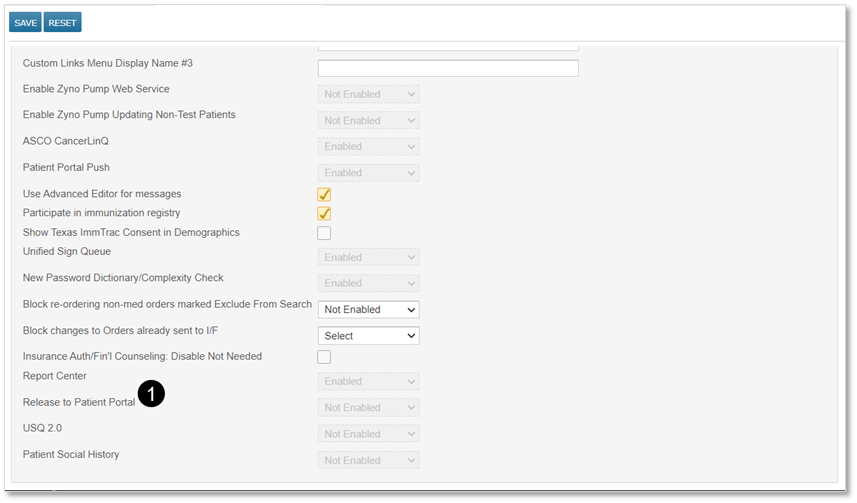
- Under Other Features, set the Release to Patient Portal setting to Enabled (see callout 1).
- Save the change.
- Be sure to log out and back in again for the update to take effect.
Releasing signed clinical notes by template type
In January 2022, practices were given the ability to designate which types of signed clinical notes should be released to the patient portals.
After a Super User enables the Release to Patient Portal practice preference, your practice can begin this process.
NOTE: Any clinical note templates created after the September release will not be set to release to patient portals. Practices must manually activate this setting if they wish for these types of signed notes to be automatically sent to patients.
For more information and step-by-step instructions, view the January 2022 release notes.
Releasing signed clinical notes on an individual basis
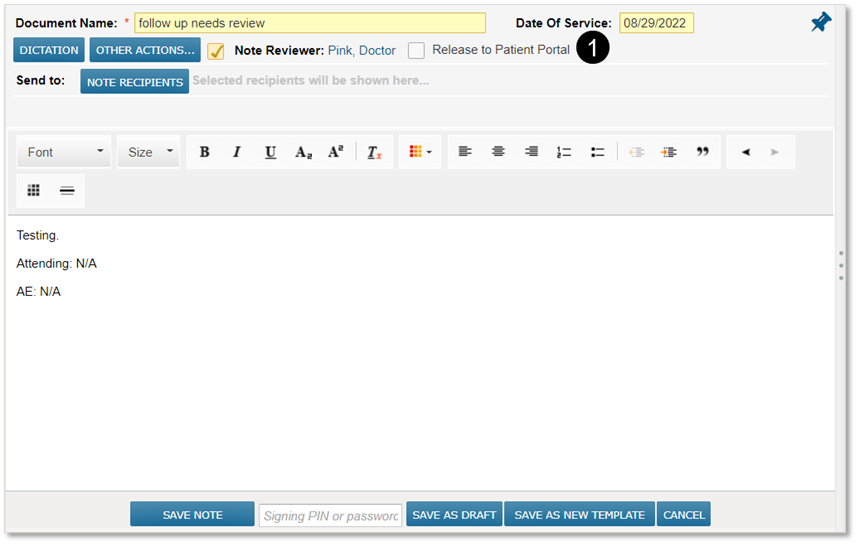
Any clinical note template set to Signed Note Available in Portal will automatically activate a new box in a note called Release to Patient Portal (see callout 1). Providers can always uncheck this box to keep a note from being released to the portal, as needed.
This setting allows your practice to comply with state laws that call for withholding certain types of notes when appropriate.