
Consistent Messaging Across Forms Widget and Upcoming Appointments Copied
What’s changing
The Forms widget will display consistent messaging between the Home screen and the Upcoming Appointments page.
Previously, forms messaging on an appointment card could appear limited to that specific appointment. Now, the same message will display for every upcoming appointment, reflecting the patient’s overall forms status rather than forms tied to one appointment.
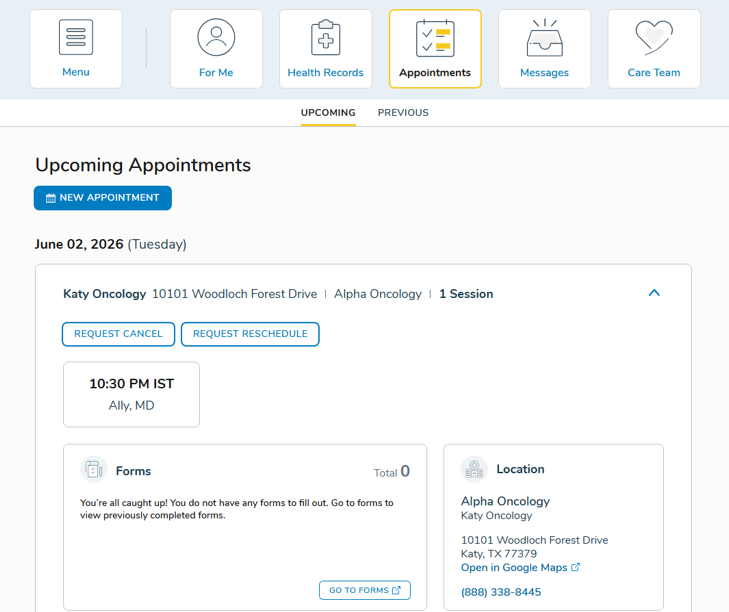
- If there are no forms to complete, both the Forms widget and the appointment card on Upcoming Appointments will display: “You’re all caught up! You do not have any forms to fill out. Go to forms to view previously completed forms.”
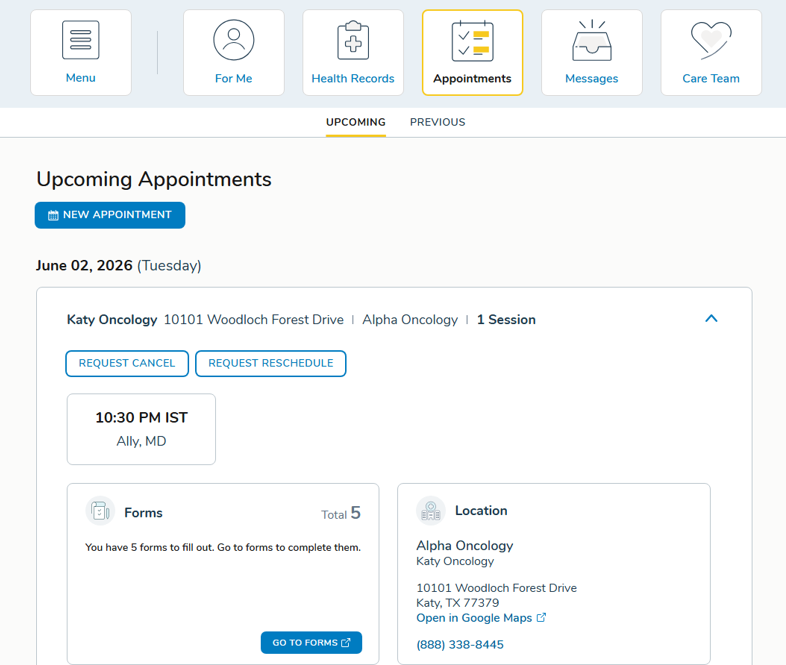
- If there are forms to complete, both locations will display: “You have [number] form(s) to fill out. Go to forms to complete them.”
Why this matters
Consistent messaging reduces confusion for patients and caregivers by presenting a single, clear picture of their forms status no matter where they encounter it in the portal. This helps ensure patients don’t miss required forms or misinterpret appointment-specific messaging as the full picture.