
Configure Screening Visits in Regimen Templates Copied
What’s changing
Practices can now configure screening visits directly within regimen templates to support protocol-required activities that occur before Cycle 1 Day 1 (C1D1) using the new Screening section in Manage > Regimen Templates.
Practices can:
- Configure up to 30 screening visit days before C1D1, including consecutive or nonconsecutive days (for example, Day -45, Day -30, Day -15, Day -7, and Day -1).
- Display screening visits using either a custom name or the default day-based label (for example, Screening Visit-30).
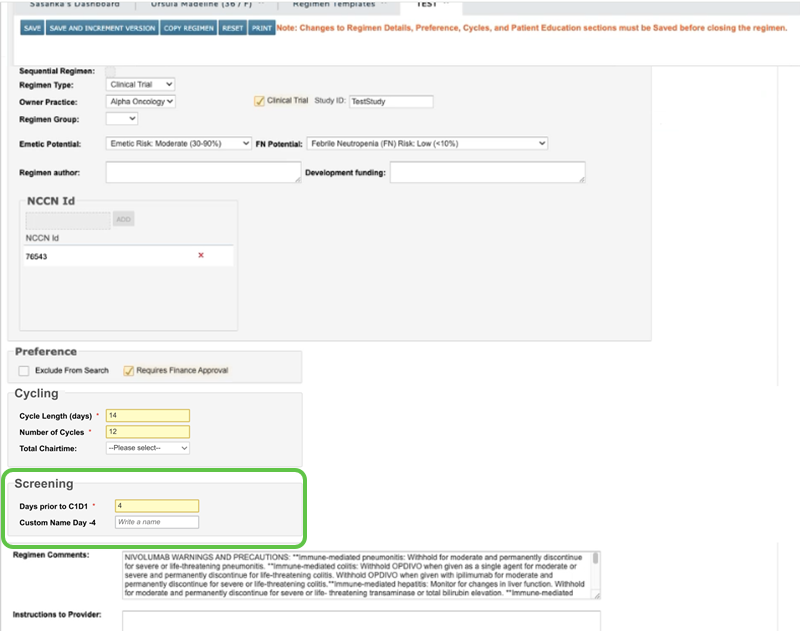
- Add orders to screening visits within the Regimen Items grid.
- Designate orders as Required or Optional for each screening visit.
- Save regimen templates that include orders scheduled for screening visits.
Configured screening visits are displayed as additional columns before Cycle 1 Day 1 within the Regimen Items grid.
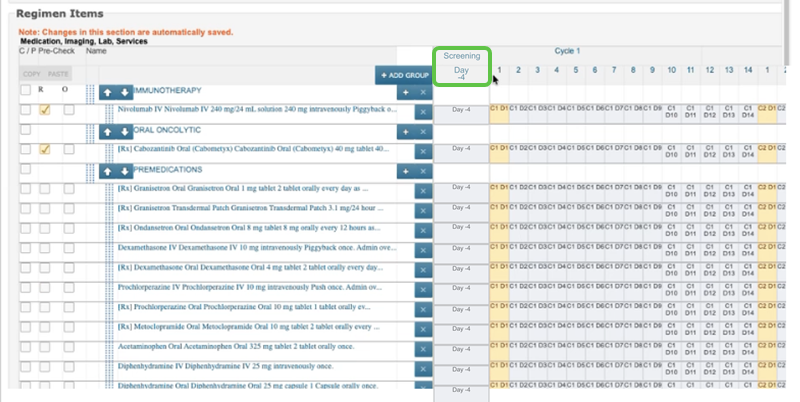
Important: This release supports configuration of screening visits within regimen templates. Ordering regimens that include screening visits for patients is not yet supported. Full end-to-end support for ordering and executing screening visits will be delivered in a future release.
Why this matters
Clinical trial protocols frequently require assessments, laboratory testing, and other activities to occur before treatment begins. This enhancement allows practices to configure regimen templates that more closely align with protocol requirements by defining activities that occur before Cycle 1 Day 1.
By enabling screening visits to be configured now, practices can prepare ahead of the future release that will support full regimen ordering. This helps reduce implementation effort later while improving protocol alignment and visibility of pre-treatment activities.
Resources
For more information, visit the Help site.