Capture patient depression scores and action plans in iKnowMed Generation 2 Copied
Screening patients for depression is key to early identification and intervention. We will roll out a new Depression Screening & Plan tab under Patient Hx in iKnowMed Generation 2 for practices to electronically capture and calculate patients’ depression scores.
The Depression Screening & Plan tab will capture this information as structured data – ensuring data completeness and enhancing interoperability with your community partners.
This is an important first step in streamlining depression screening and documenting the plan for Value-Based Care Programs, presenting the opportunity to document electronically instead of using a paper form.
NOTE: At this time, the documentation for MIPS 134 Screening for Depression must continue to be completed in Clinical Profile > Observations to calculate the MIPS measure. In a future release, we will work to decrease the documentation burden by updating the Observations tab when a PHQ2 or PHQ9 is completed electronically in iKnowMed. We will share those updates when they’re ready.
To record a patient’s depression screening:
- Open a patient chart and go to Clinical Profile > Patient Hx.
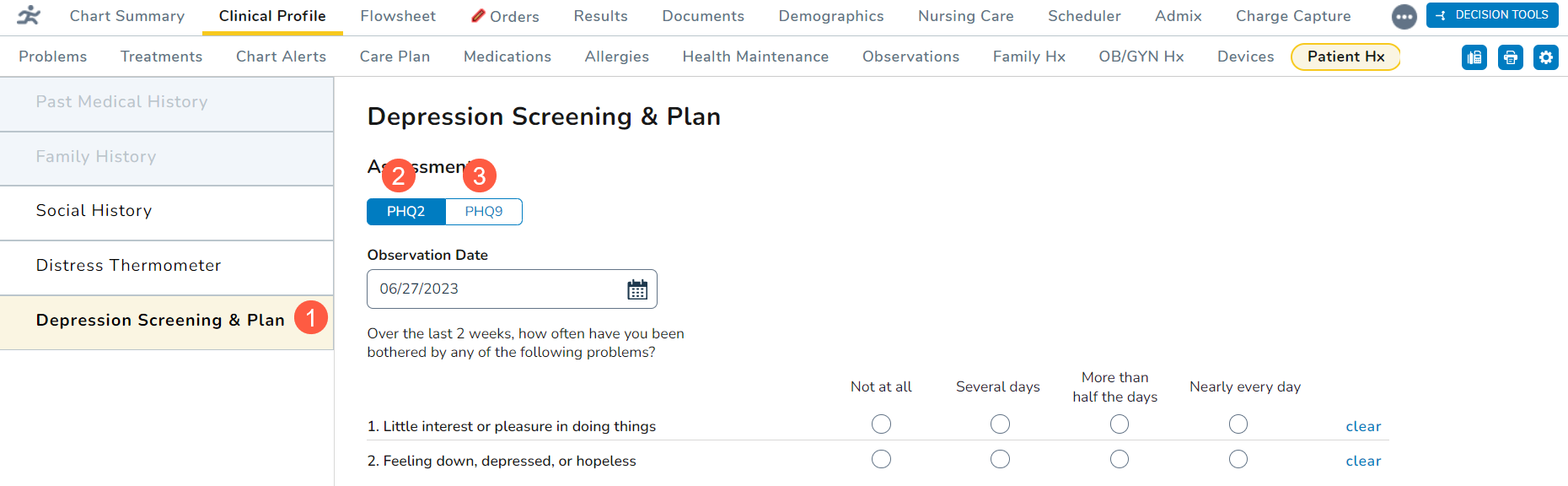
- Click on the new Depression Screening & Plan tab (callout 1).
- Choose whether the patient was screened using the PHQ-2 or PHQ-9 questionnaire (callouts 2 and 3).
- PHQ-2 should be used as a first-step approach to screen for the frequency of depressed mood and anhedonia over the last two weeks.
- PHQ-9 should be used for patients with a depressive disorder to screen, diagnose, monitor, and measure the severity of depression over the last two weeks.
PHQ-2
To complete this questionnaire:
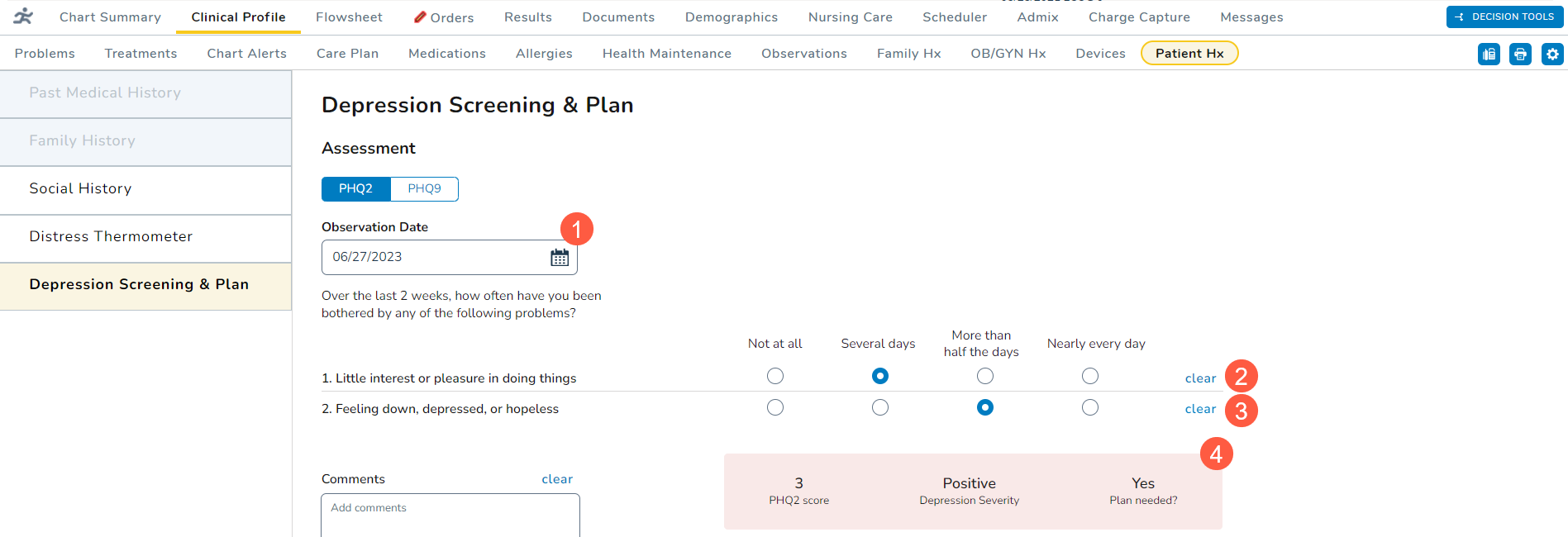
- Select an Observation Date using the calendar widget (callout 1). You may select a past date or today’s date, but you cannot select a future date.
- For the first question, select an answer for whether the patient indicated little interest or pleasure in doing things over the last two weeks (callout 2).
- Notice that the score box automatically begins calculating a score based on your selection.
- For the second question, select an answer for whether the patient has felt down, depressed, or hopeless over the last two weeks (callout 3).
- Depending on your answer, the score box will calculate a final score (callout 4). Any score of 3 or greater indicates that a depressive disorder is likely.
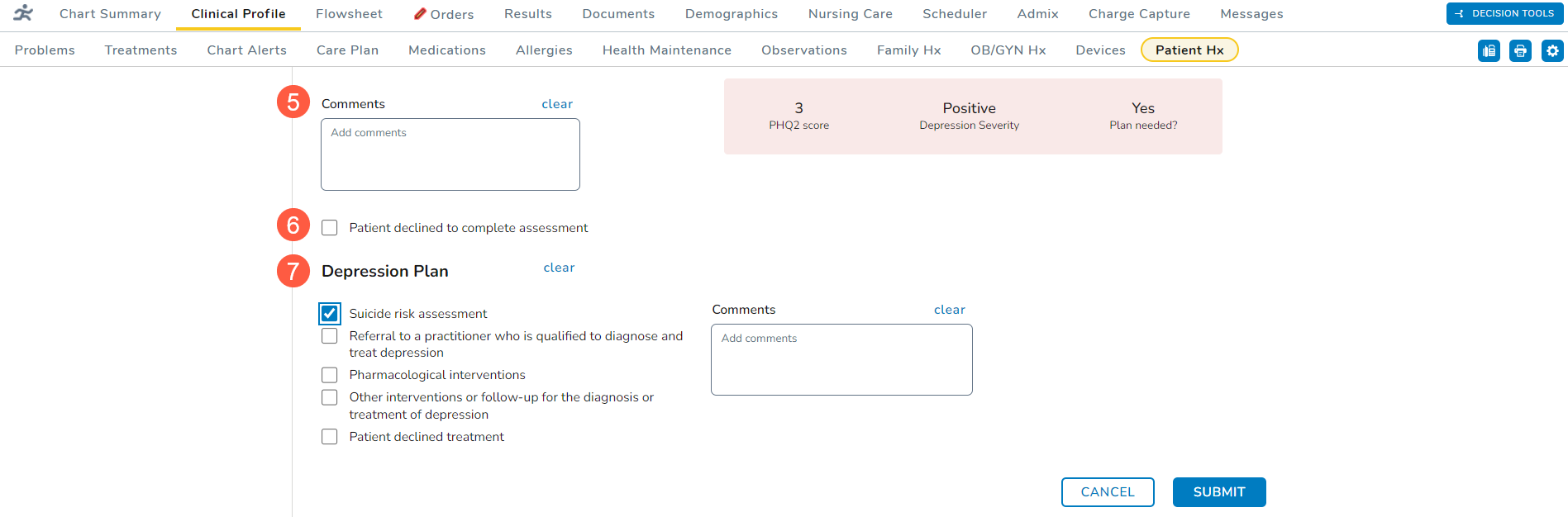
- You may enter any Comments for this patient’s screening (callout 5).
- If the patient declines the screening, check the box next to the declination statement (callout 6).
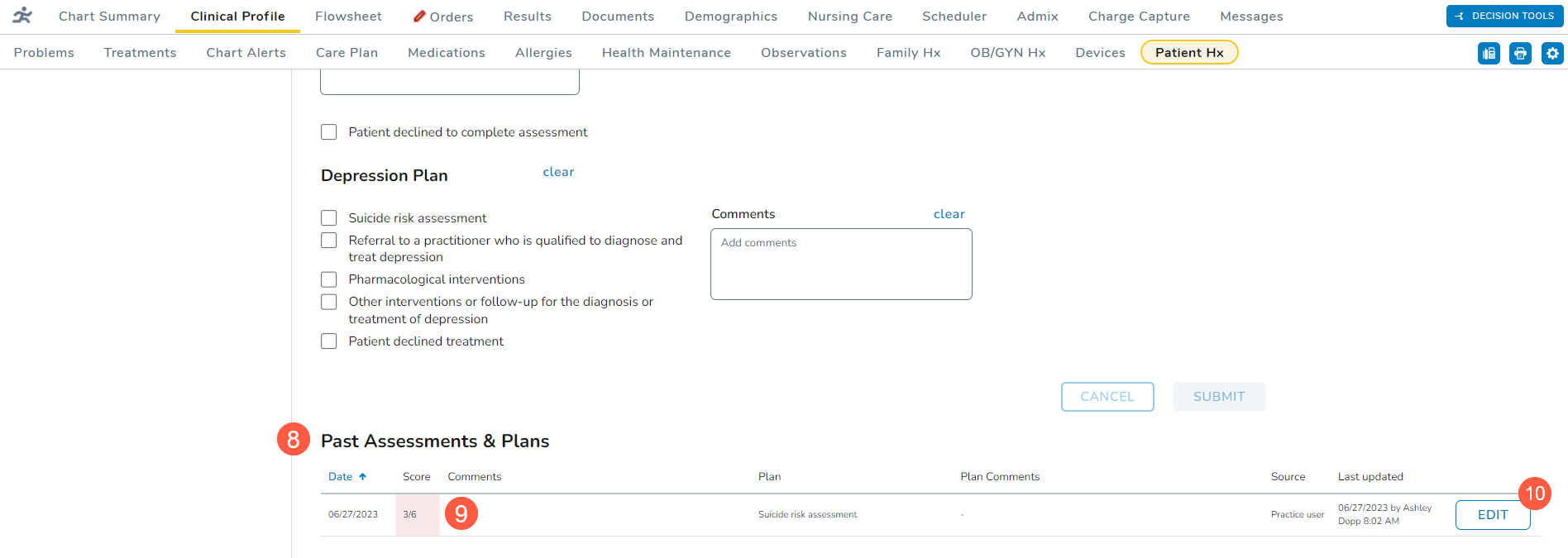
- Use the Depression Plan section (callout 7) to capture the next steps and comments on to move forward with treating the patient, if needed.
- A plan can still be captured even if the patient declines the screening.
- Submit the screening once it’s complete.
- Upon submission, any screening with a score of 3 or greater will trigger a notification that the patient should be further evaluated with the PHQ-9. If you choose to switch to the PHQ-9 questionnaire, the system will copy over the answers already entered in the PHQ-2.
- Also, any screening submitted with a high score requires a plan of action. If a screening with a high score is submitted without a plan, the system will display a notification that a plan must be completed.
- Previous entries will appear under the Past Assessments & Plans section (callout 8).
- Under this section, you may view the date, score, plan, comments, and more of previous entries.
- Any entry marked with a pink color indicates a high score (callout 9).
- Clicking the Edit button (callout 10) allows you to adjust the answer of previous entries if corrections are needed.
- In a future release, the Past Assessments & Plans section will include an audit history with complete details regarding changes made to the assessments and plans, such as what sections were updated, what information was added/updated, and by whom.
PHQ-9
To complete this questionnaire:
- Select an Observation Date using the calendar widget (callout 1). You may select a past date or today’s date, but you cannot select a future date.
- Begin selecting answers for whether the patient has been bothered with the listed problems over the last two weeks (callout 2).
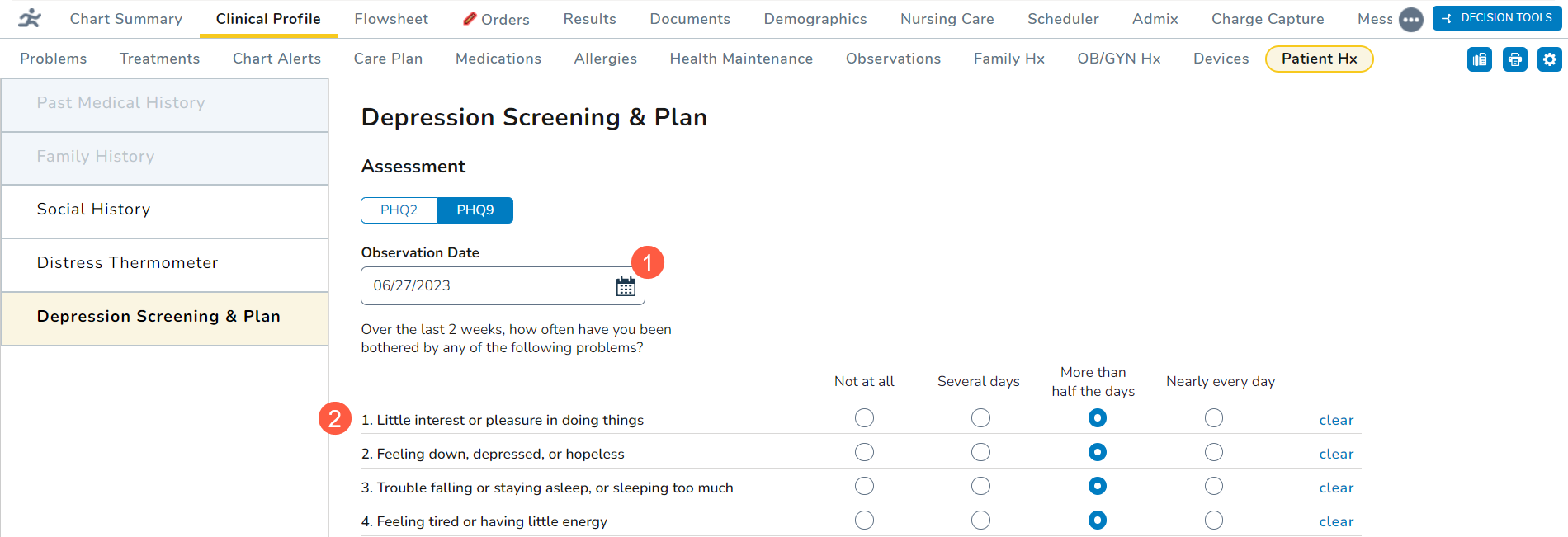
- Notice that the score box automatically begins calculating a score based on your selections.
- Depending on your answers, the score box will calculate a final score (callout 3). Any score of 15 or greater indicates moderately severe or severe depression.
- You may enter any Comments for this patient’s screening (callout 4).
- If the patient declines the screening, check the box next to the declination statement (callout 5).
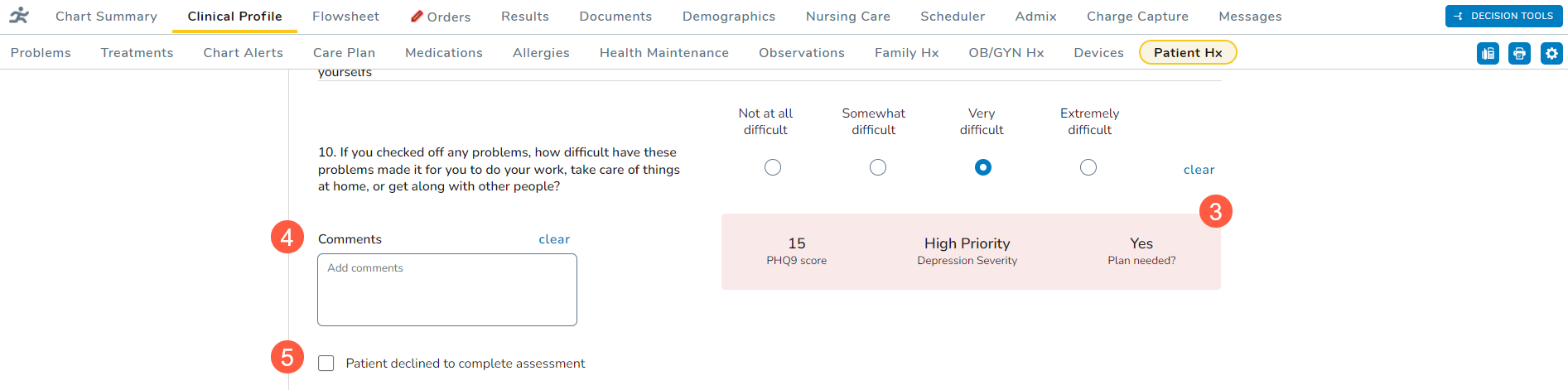
- Use the Depression Plan section (callout 6) to capture the next steps and comments on to move forward with treating the patient, if needed.
- A plan can still be captured even if the patient declines the screening.
- Submit the screening once it’s complete.
- Any selection other than not at all under question 9 for suicide and self-harm will result in a high score. Upon submission, the system will display a notification that action must be taken before the patient leaves the practice.
- Also, any screening with a score of 15 or greater will require a plan of action. If a screening with a high score is submitted without a plan, the system will display a notification that a plan must be completed.
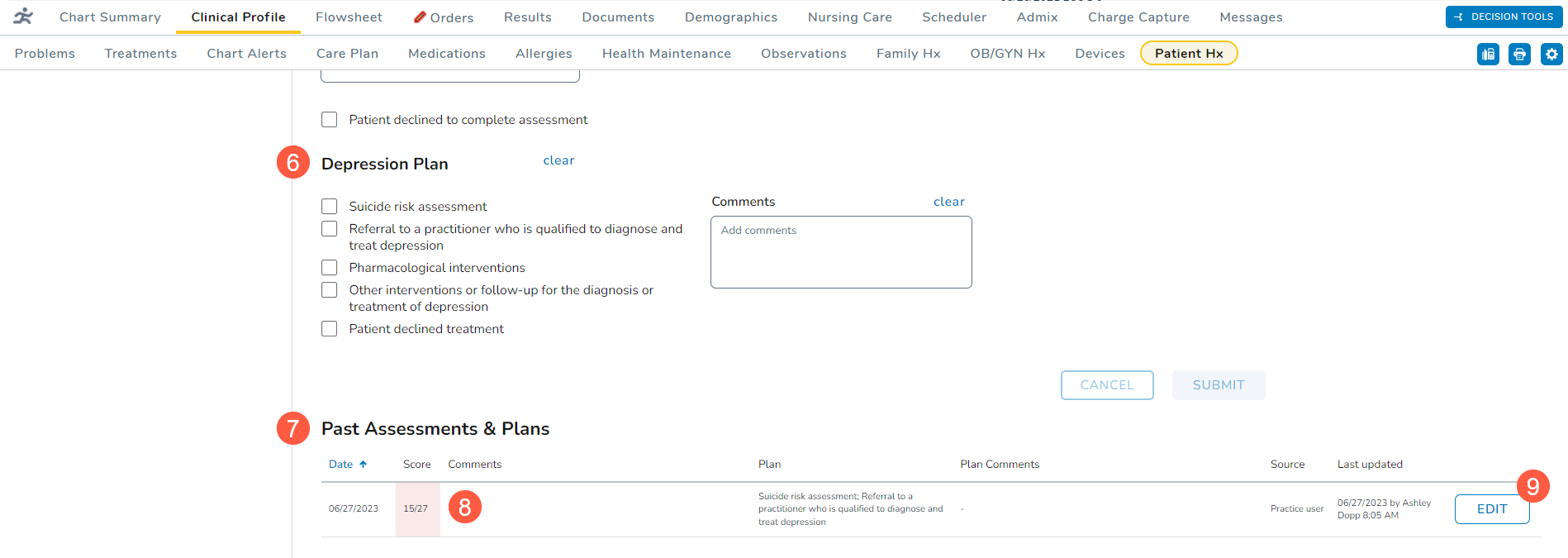
- Previous entries will appear under the Past Assessments & Plans section (callout 7).
- Under this section, you may view the date, score, plan, comments, and more of previous entries.
- Any entry marked with a pink color indicates a high score (callout 8).
- Clicking the Edit button (callout 9) allows you to adjust the answer of previous entries if corrections are needed.
- In a future release, the Past Assessments & Plans section will include an audit history with complete details regarding changes made to the assessments and plans, such as what sections were updated, what information was added/updated, and by whom.