Auto-release of Imaging and “Other Documents” from Results tab Copied
To comply with the 21st Century Cures Act and ensure patients receive timely access to their health information, iKnowMed now supports the automatic release of Imaging and Other Documents from the Results tabs to patient portals.
NOTE: Only items in the patient’s Results tab will be auto-released at this time. Items with a review category of Labs or Imaging viewed in the Documents will not be auto-released until April 2025.
How it works
Once imaging or other documents are added to the Results tab in a patient’s chart, they will automatically become available in the patient portal, unless:
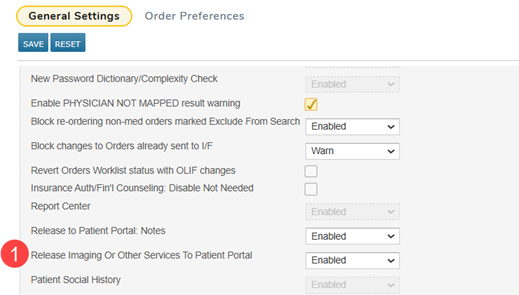
- Your practice temporarily disables the auto-release feature by turning off the Release Imaging Or Other Services To Patient Portal preference (callout 1).
- This preference allows for a six-month hold on auto-releasing results, providing your practice with time to adjust workflows accordingly. After the six-month period, the preference will be removed from iKnowMed and the auto-release functionality will be enforced.
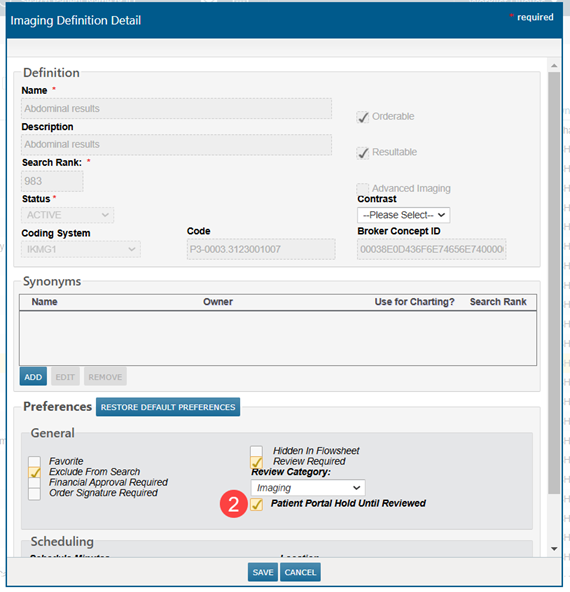
- Your practice prevents the item from being released until reviewed, by going to Manage > Labs/Imaging & Services and editing the item to turn on the Patient Portal Hold Until Reviewed setting (callout 2).
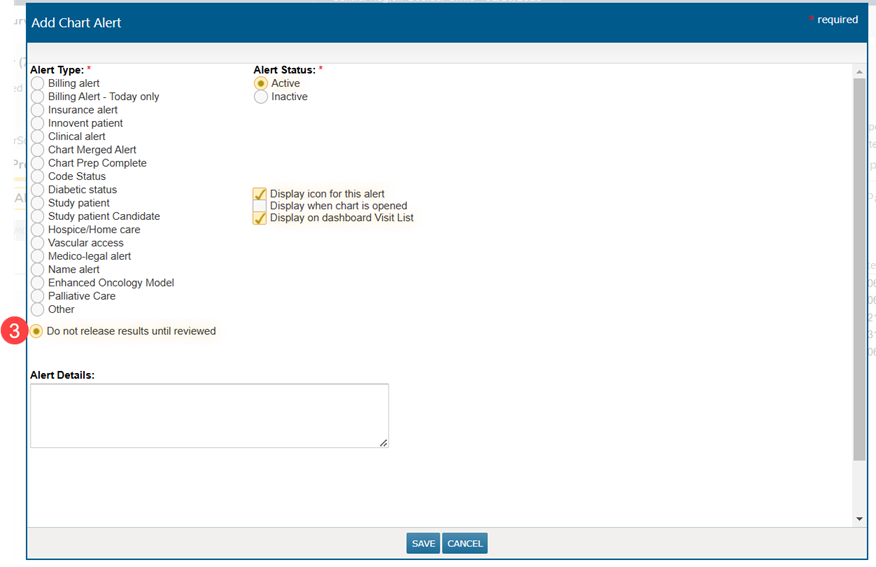
- The patient has an active Do not release results until reviewed chart alert, preventing items from the Results tab from being released until reviewed (callout 3).