
Admin: User management updates Copied
What’s changing
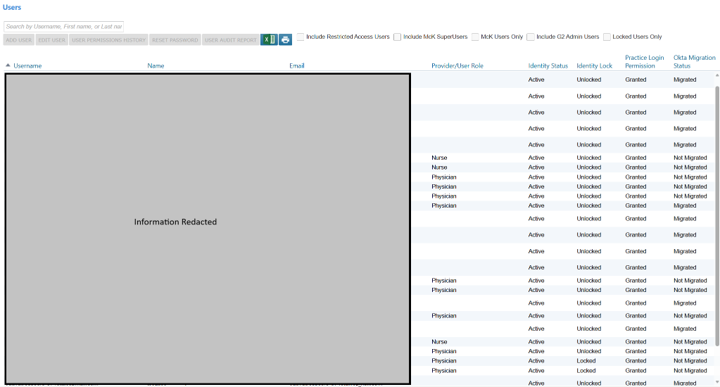
The Admin > Users page will be updated to reflect how user identity and access are managed through Okta. Several new columns have been added to the Users list and controls for managing migrated accounts have been updated accordingly.
New columns in the Users list
The following columns will appear on the Admin > Users page:
- Email: Displays the email address associated with the user account
- Identity Status: Reflects whether the user’s identity is active or locked; now controlled by Okta, not iKnowMed
- Identity Lock: Indicates whether the account has been locked at the identity provider level
- Practice Login Permission: Shows whether a user currently has access to log into the practice
- Granted: User has active login permission
- Revoked: User previously had access but no longer does
- Okta Migration Status: Indicates whether a user account has been migrated to Okta
Account management for Okta-migrated users
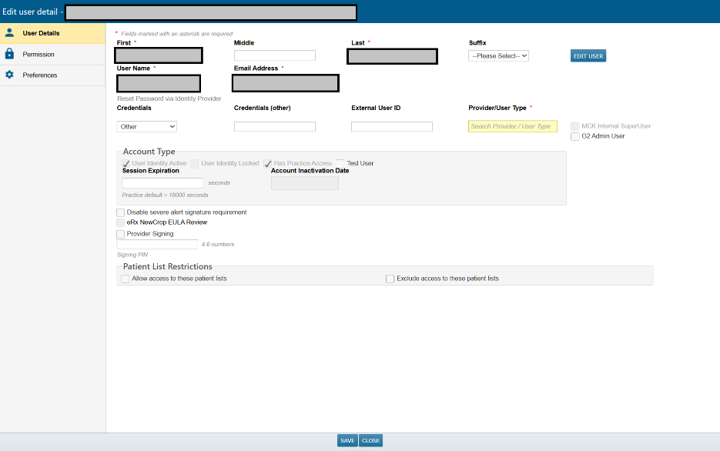
For users who have migrated to Okta, identity status and identity lock will be managed entirely within Okta. Practice Admins can no longer activate, deactivate, lock, or unlock these accounts from within iKnowMed. These actions must be performed in your identity provider directly.
Legacy accounts, those created and still managed within iKnowMed, can continue to be locked and inactivated from within the application as before.
Previously hidden users to be restored
We will correct an issue where users whose practice access was revoked were no longer visible within iKnowMed. All affected users will be restored and accessible from the Admin > Users page. No data was lost or impacted. Only visibility to those user records was affected.
Why this matters
As practices transition to Okta for identity management, it’s important that iKnowMed accurately reflects where account controls live. These updates give admins a clearer, more complete view of who has access to their practice, while preventing conflicting actions between iKnowMed and Okta.