
Additional enhancements Copied
Enhanced navigation
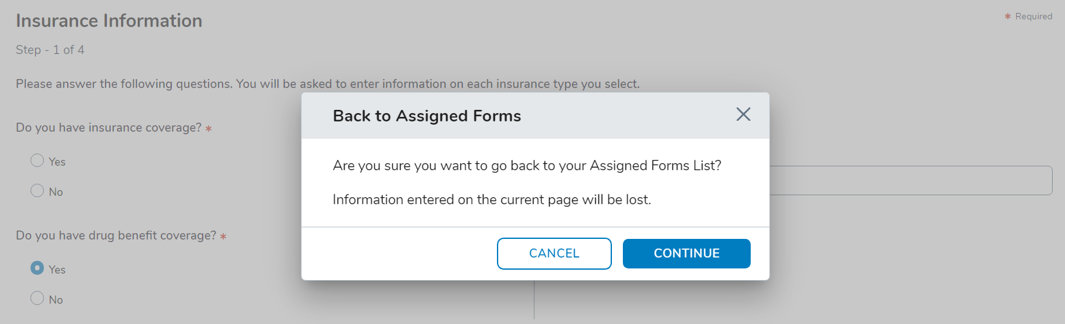
Clicking the practice logo or name at the top-left corner of the screen now opens a confirmation window to navigate back to the Assigned Forms page. Selecting Cancel keeps the user on the current page, while Continue returns them to Assigned Forms.
This confirmation window also appears when clicking the Back To Forms List link at the top of each form. Selecting Cancel keeps the user on the current page, while Continue returns them to Assigned Forms.
Lastly, the messaging in this window clarifies that exiting a form will only lose data on the current page, while previously completed sections remain saved.
Electronic Mail Authorization Form update
The form content now includes language to reinforce that Ontada Health does not and will not activate an account without patient authorization. This update applies to both new and in-progress forms.
Enhanced email address validation
Practice, patient, and caregivers can now use email addresses containing hyphens to access and interact with the e-Registration experience without issue.
Streamlined authentication experience
The authentication flow has been updated to appear less like an account creation or login process. Required field indicators (asterisks) have been removed for a cleaner look and help content has been updated to remove references to logging in.