
Enhancements to the new Orders Queue Copied
We continue to update the new Orders Queue to improve workflow efficiency and order management and align with the legacy queue.
Easily update order perform location
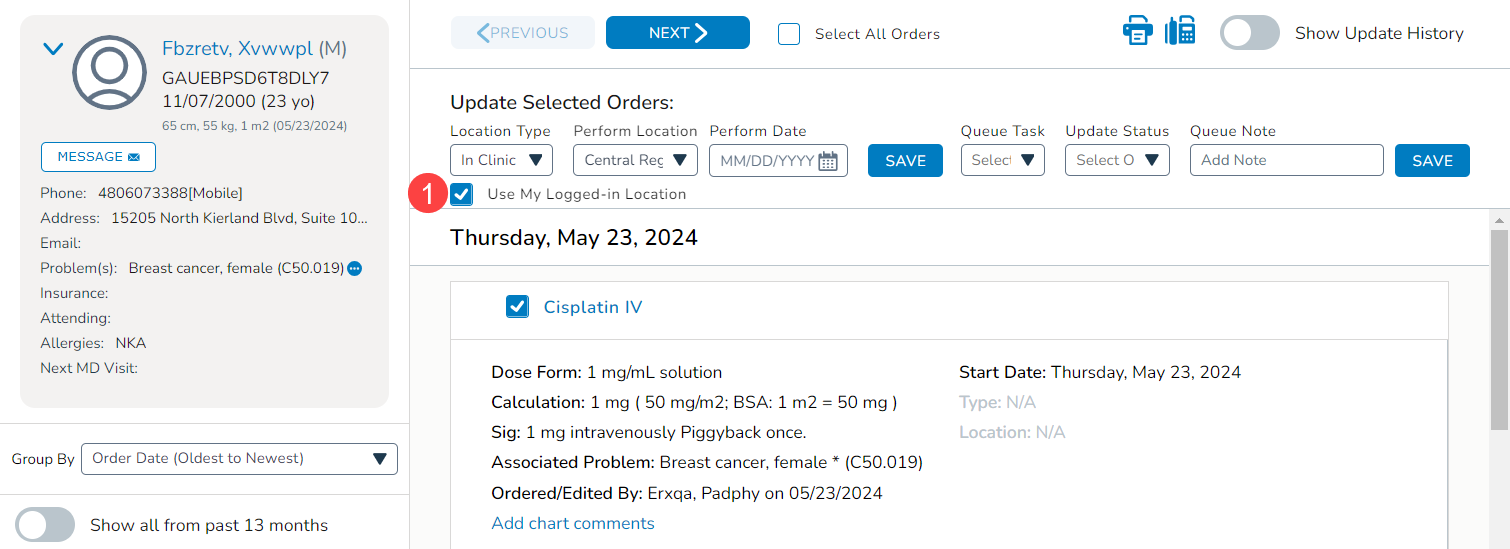
We simplified updating the perform location for orders by reducing the number of clicks required for some use cases. Now, you can quickly update the Location Type and Perform Location for selected orders by checking the box next to the new Use My Logged-In Location option (callout 1). This will automatically add the location you are logged into. You may still change that location if necessary.
This enhancement addresses a gap between the legacy queue and the new one. It also allows for quick and automatic updates, reducing manual entry errors and ensuring that orders are accurately assigned to the correct location.
Orders show based on last modified date
Previously, the order date filter in the Orders Queue displayed orders based on the date the order was created.
Now, for non-regimen orders, that filter presents orders based on their last modified date. For orders that have never been edited, the last modified date is the date the order was created. For orders updated from the flowsheet or the Order History, the order date is the date of the most recent update. Modifications done in other worklist queues or in the orders queue do not impact the order date.
Displaying orders based on the last modified date ensures that the most current and relevant orders are at the forefront. This also helps prevent missed updates and ensures all changes are accounted for, reducing the risk of overlooking important modifications.