
Prepare Now: Configure document settings for future release of all documents to patient portal Copied
Changes are coming to Admin > Document Types to help practices control which documents are shared with patients and caregivers through the patient portals.
NOTE: These settings will be available immediately for configuration, but the full functionality will not be activated until July 26, 2025.
Updates to Admin > Document Types
See key details on the Document Types table Feature
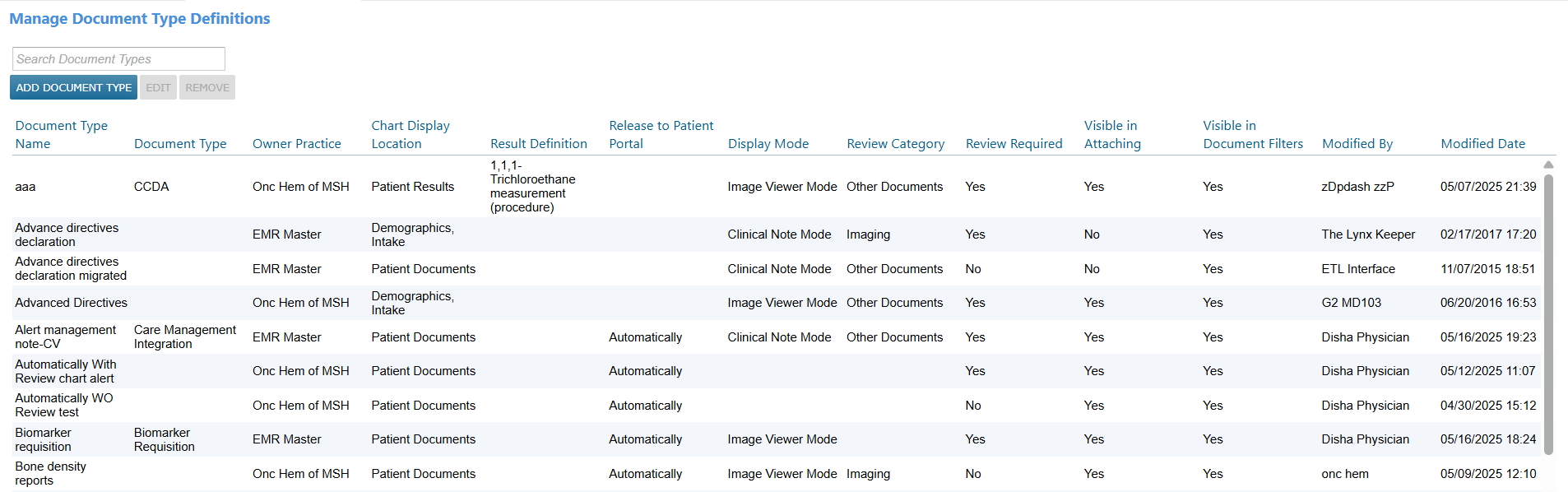
The table in Admin > Document Types now includes more information at a glance. There is no need to click “Edit” to view key details.
New columns include:
- Document Type
- Chart Display Location
- Result Definition
- Release to Patient Portal
- Display Mode
- Review Category
- Review Required
- Visible in Attaching
- Visible in Document Filters
- Modified By
- Modified Date
Action Required: Configure document sharing settings by July 25, 2025
Practices must review and update their document type settings in Admin > Document Types by July 25, 2025.
Starting July 26, 2025, the system will begin using these settings to determine which documents are shared with patients and caregivers via the patient portals.
Step 1: Ensure documents appear in the Documents tab of the patient’s chart
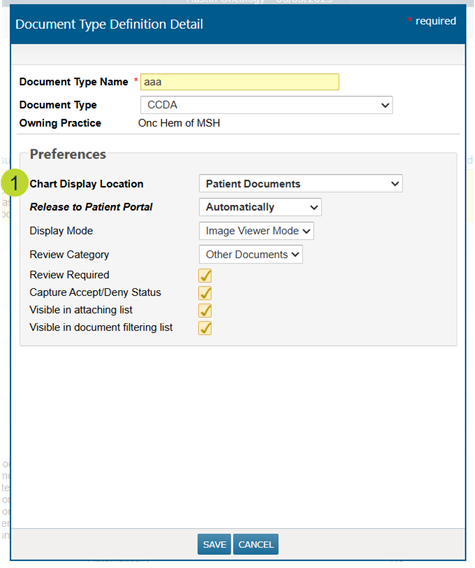
To be eligible for portal sharing, a document must first appear in the Documents tab of the patient’s chart.
When adding or editing a document type, set the Chart Display Location to Patient Documents for any document type you want to be considered for portal release (callout 1).
Step 2: Configure portal sharing behavior
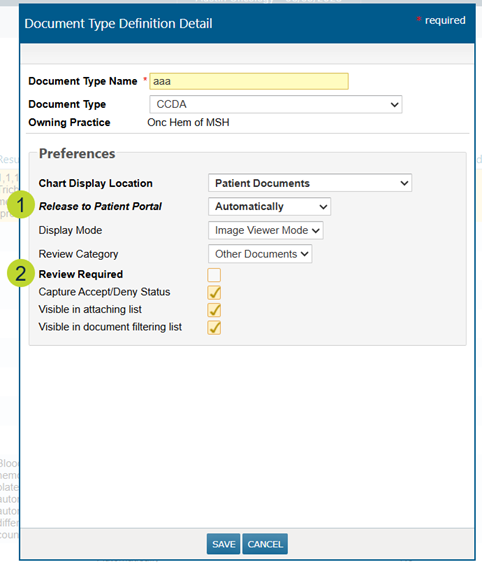
Two key fields control how documents are shared from the patient’s chart to the portal:
- Release to Patient Portal (callout 1)
- Automatically (default): Document is released immediately.
- Hold Until Reviewed: Document is held until reviewed.
- Never: Document is never released.
- If “Never” is selected, a reason must be entered to remain compliant with the Cures Act.
- Review Required (callout 2)
- Unchecked by default.
- Check this box to require a review before the document is released.
How these settings work together
Document release from the Documents tab of the patient chart will be controlled by the “Release to Patient Portal” and “Review Required” settings, as well as the “Do not release results until review” chart alert:
| Release to Patient Portal | Review Required | “Do not release until review” chart alert | Result |
|---|---|---|---|
| Automatically | Unchecked | Inactive | Released to portal |
| Automatically | Unchecked | Active | Not released to portal |
| Automatically | Checked | Inactive | Released to portal |
| Automatically | Checked | Active | Requires review before release |
| Hold Until Reviewed | Unchecked | Inactive | Not released to portal |
| Hold Until Reviewed | Unchecked | Active | Not released to portal |
| Hold Until Reviewed | Checked | Inactive | Requires review before release |
| Hold Until Reviewed | Checked | Active | Requires review before release |
| Never | Any | Any | Not released to portal |