
Support for Shared Accounts Across Practices Copied
What’s new
Previously, patients receiving care from multiple practices were required to use a unique email address for each portal account. With this enhancement, patients and caregivers can now consolidate their accounts under a single email address within their respective user type.
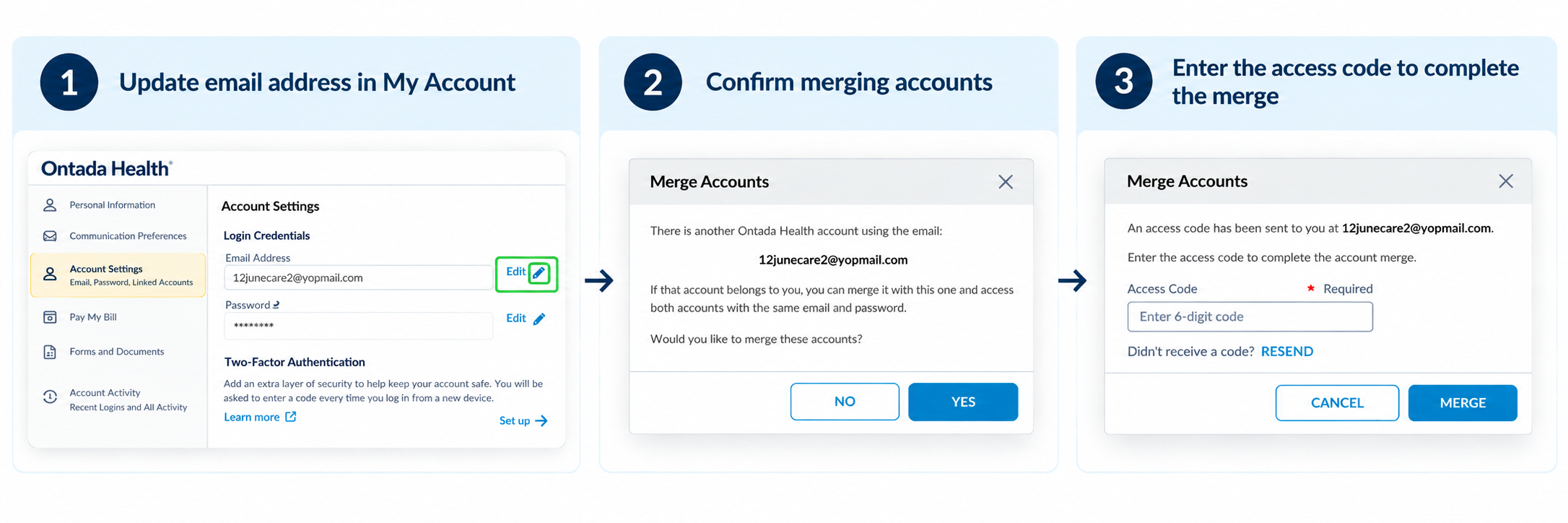
How patients and caregivers can choose one email address for multiple accounts
Patients and caregivers can update their email address through My Account in the patient portal. If they enter an email address that is already associated with another account, they will receive a notification informing them that the email address is already in use and asking whether they would like to merge their accounts.
To complete the change, an access code is sent to the email address, which must be entered in the portal to verify ownership and confirm the update.
Note: Patients and caregivers can use the same email address for their account across practices. Patients within the same practice must still use separate email addresses.
How practice staff can update patient email addresses across multiple accounts
Practice staff can update patient and caregiver email addresses through Support Tools.
To support account consolidation, Support Tools now includes a new Email search filter, allowing staff to search for patients using an email address. Search results will display all accounts associated with that email address.
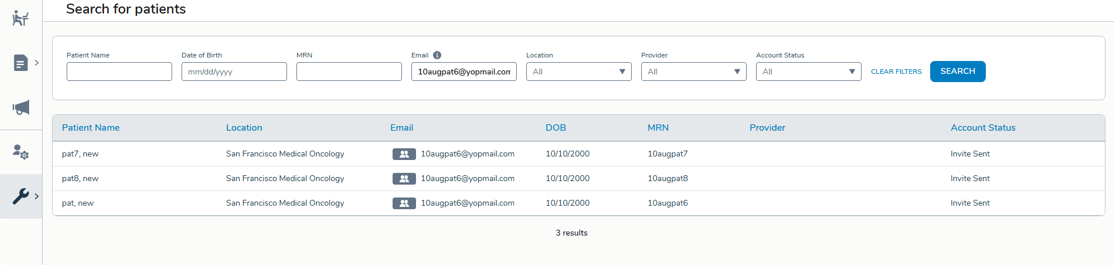
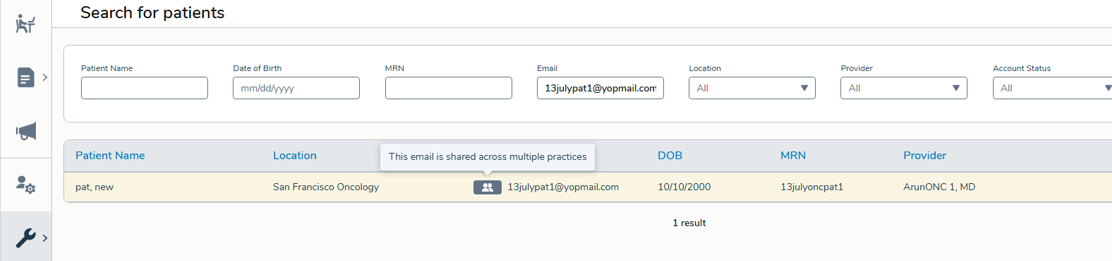
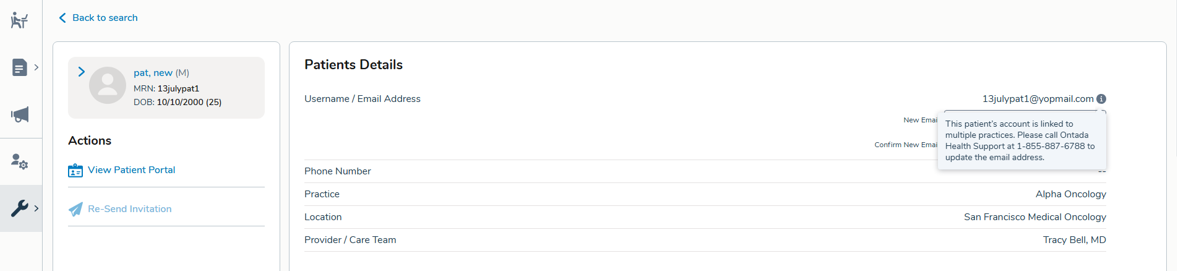
When an email address is associated with multiple accounts, a visual indicator appears and hovering over it displays a message that this email is shared across multiple accounts.
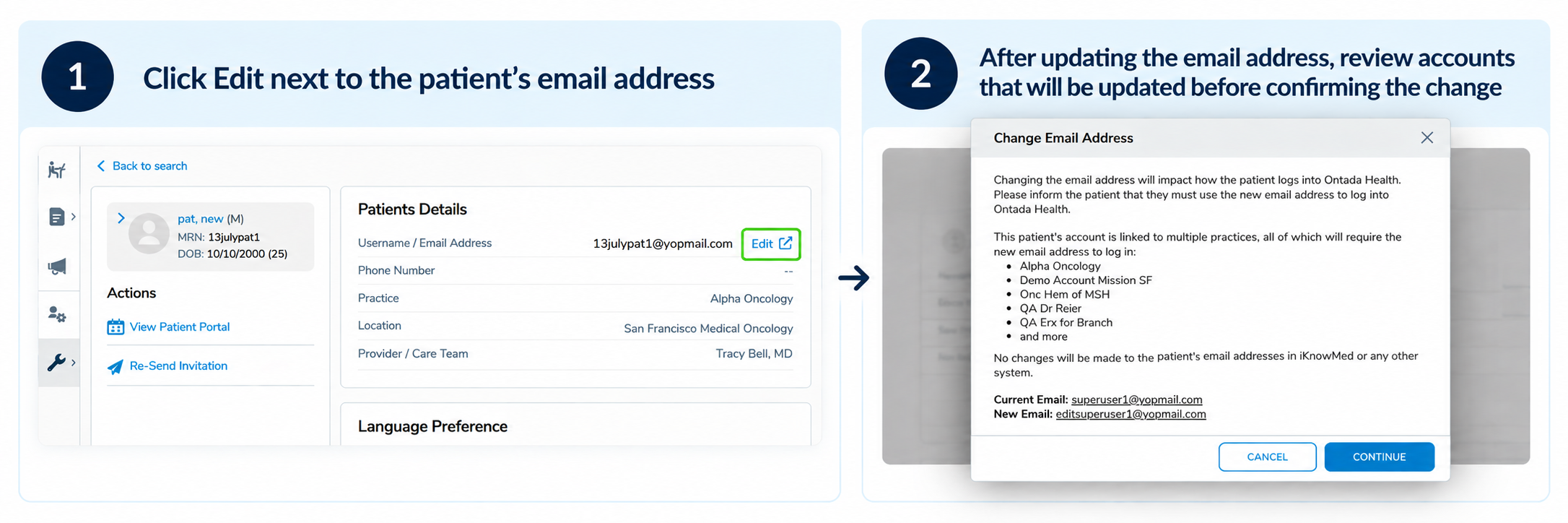
After selecting a patient, click the Edit option next to their email address in Patient Details to update the email address associated with their patient portal account. With this enhancement, practice staff can update the email address to one that is already associated with an account at another practice. This initiates the account linking process and sends an invitation to the patient to complete enrollment.
After the patient completes enrollment and the account becomes linked across multiple practices, a visual indicator appears in Support Tools. Hovering over the indicator displays a message that the email is shared across multiple accounts. At that point, the shared email address can no longer be updated by practice staff. If an email address associated with multiple practices needs to be changed, practices should contact Ontada Health Technical Support for assistance.
How practices can invite patients who already have portal accounts
The process for inviting patients and caregivers to the portal remains unchanged. Practice staff can continue to send and resend portal invitations through Support Tools using the same workflow available today.
With this enhancement, invitations can now be sent to email addresses that are already associated with a portal account at another practice. When the invite is accepted, the system guides the user through the appropriate account linking process, allowing them to use the same email address and credentials across multiple practices.
This enhancement removes the need for patients and caregivers to maintain separate email addresses for portal access at different practices while preserving the existing invitation workflow for practice staff.
Reporting enhancements
Several reports have been enhanced to support shared account functionality:
Notification Audit Report
- Displays the new Email Change Confirmation notification type.
- Tracks access code emails sent during the email verification process.
- Provides visibility into the notifications being delivered to patients and caregivers.
Patient Enrollment Report
- Continues to capture new portal account creation activity.
- Includes patients who create an additional portal account for another practice, even when the same email address is already associated with an existing portal account.
Why this matters
Managing multiple email addresses for portal access can create unnecessary complexity for patients and caregivers receiving care across multiple practices. This enhancement simplifies account management by allowing users to maintain a single email address across their portal accounts, while built-in verification steps help ensure security and account ownership. Additional Support Tools and reporting enhancements provide practice staff with greater visibility into shared accounts and related patient communications.