Expanded access to and control of patient information during the transition to Ontada Health Copied
Several enhancements were made to help ease the transition between My Care Plus and Ontada Health patient portals for patients and practices and to create a more seamless and user-friendly experience within the Ontada Health platform.
New Account Status section to monitor patient account progress
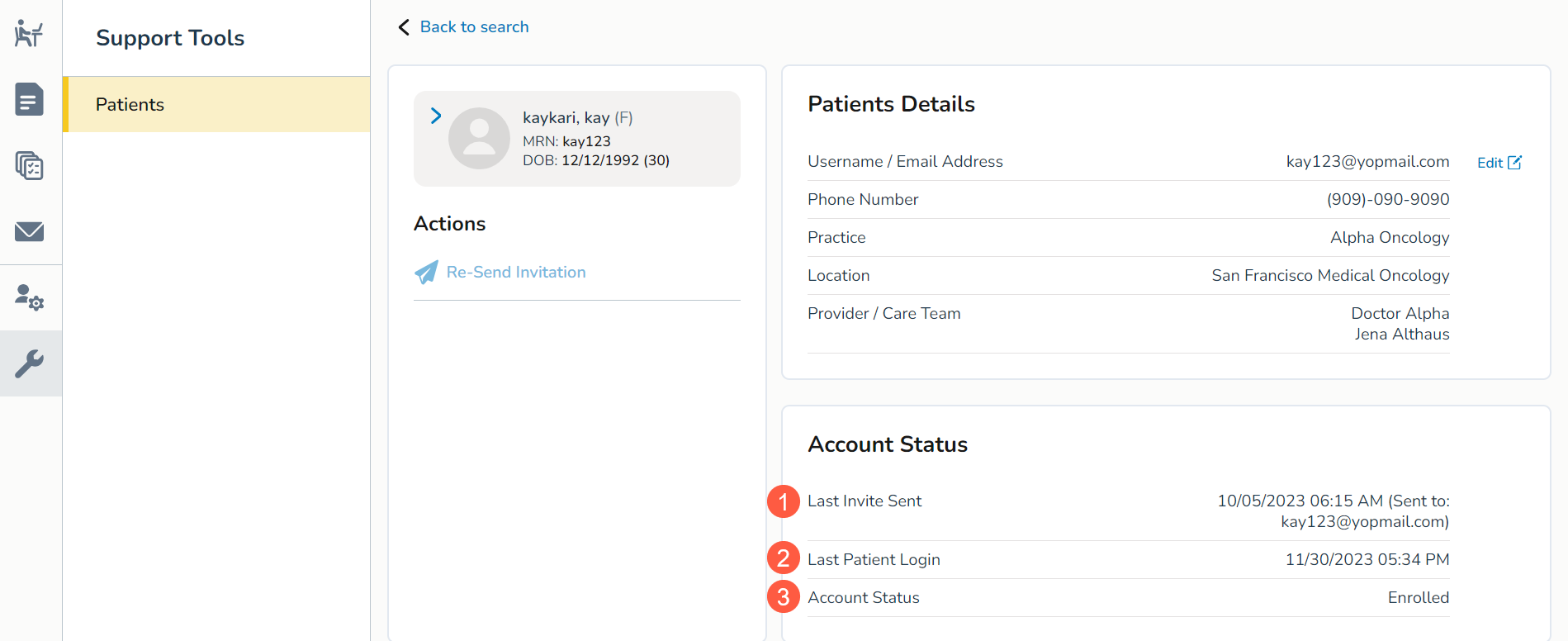
The Support Tools queue now includes a new Account Status section, providing comprehensive insights into a patient’s journey as they create their Ontada Health patient portal account. Key information captured include:
Last Invite Sent
Displays the date, time, and email address associated with the most recent portal invitation sent to a patient (callout 1). If no invitation has been sent, the system will indicate “N/A.”
Last Patient Login
Presents the date and time of the patient’s last login to Ontada Health (callout 2). If the patient has not logged in, the system will display “N/A.”
Account Status
This section outlines the patient’s enrollment status with the following options (callout 3):
- N/A: The practice is not utilizing the Ontada Health portal.
- Not Consented: The patient Portal flag is not set to Yes, and the patient has not created an Ontada Health account.
- Invite Sent: The most recent invite was successfully delivered, but the patient has not created an account.
- Invite Failed: The most recent invite failed to send or be delivered, with detailed reasons for the failure.
- Invite Expired: The most recent invite has expired.
- Account Created, Not Verified: The patient created an account but has not completed the verification process.
- Enrolled: The patient has created an account and completed verification.