
Deceased and Hospice Patients Display in Admin Search Results Copied
What’s changing
Deceased and hospice patients will now be searchable and visible in the Admin Tools. When a patient marked as Deceased or Hospice appears in search results, the system will append the appropriate status label after the patient’s name, separated by a dash. Patients without either status will show no label.
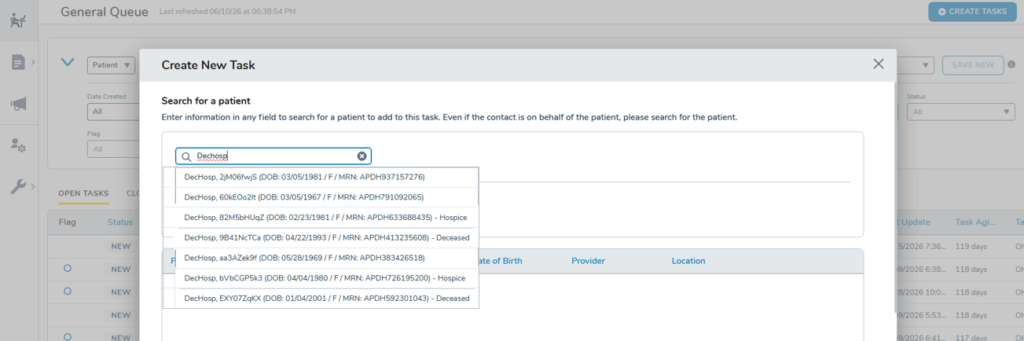
On pages where interaction with these patients isn’t permitted — Bulk Actions > Send Forms and Bulk Actions > Send Announcements — deceased and hospice patients will appear but be disabled and non-selectable.
On pages where interaction is permitted — General Queue and Forms Queue — deceased and hospice patients will remain enabled and selectable despite showing the status label.
Why this matters
Previously, deceased patients could not be found in the Admin Tools, making it impossible for practices to manually manage outstanding items tied to the patient, such as withdrawing forms. By making deceased and hospice patients searchable, with clear status labeling and appropriate access controls, practices can locate and manage these records when needed.