Flexible Health Records Viewing Copied
Patients and caregivers can now tailor their health records viewing experience. This enhancement offers patients and caregivers a more personalized experience within the portal.
How to select a custom timeframe
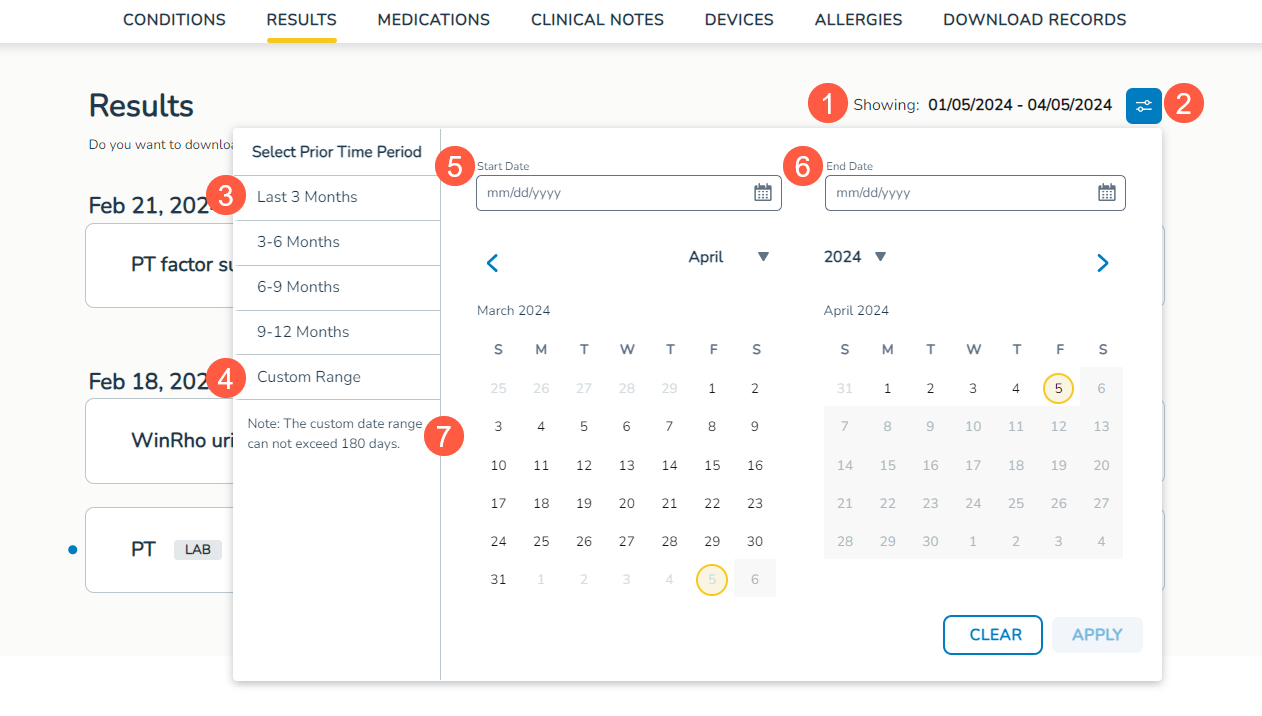
- On the Health Records > Results page, the current timeframe of results will continue to display in the upper-right corner of the page (callout 1). The default date range remains as the last 3 months.
- Click on the date range icon (callout 2) to open the window where a custom date range can be selected.
- In the left-hand navigation, choose from preset timeframes such as the last 3 months, 3-6 months, 6-9 months, or 9-12 months (see callout 3 for example).
- Alternatively, choose a custom timeframe (callout 4) and select a Start Date and End Date (callouts 5-6) using the provided calendars.
- A note within the window reminds users that custom date ranges cannot exceed 180 days (callout 7).
- Upon applying the selection, the dates displayed in the upper-right corner will reflect the chosen timeframe, and results on the page will automatically adjust to display data within the specified range.