
Supportive Care Interventions: Add multiple assessments over time Copied
You can create multiple Patient History > Supportive Care Interventions assessments for a patient, including multiple assessments on the same date of service, rather than only editing the most recent one.
What’s new
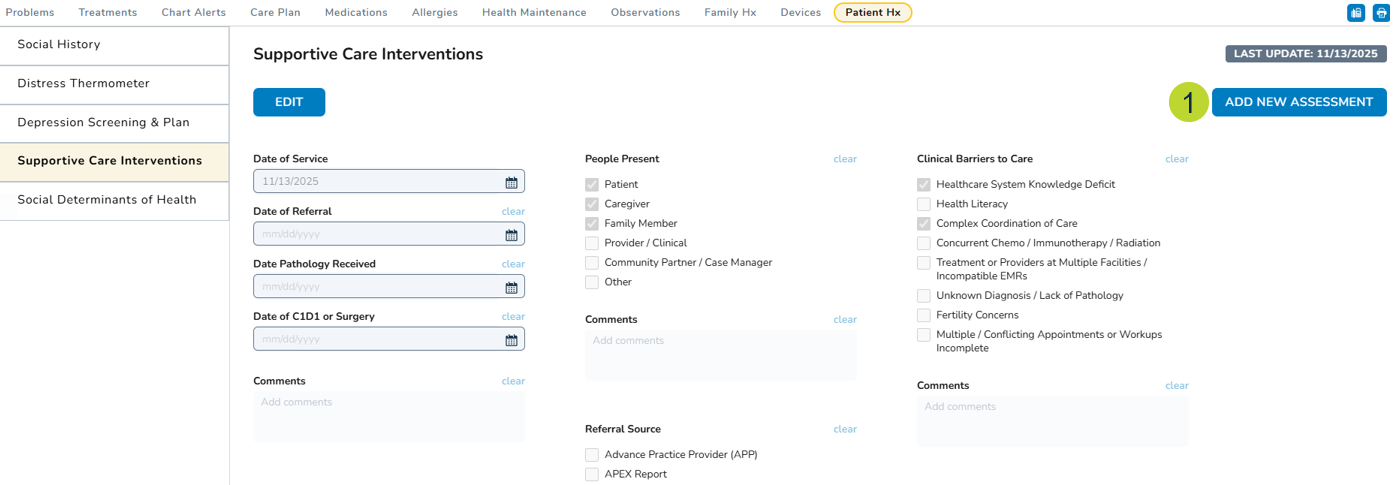
After saving an initial Supportive Care Intervention, a new “Add New Assessment” button (callout 1) appears on the page.
Clicking this button allows you to create a new entry with today’s date as the default Date of Service.
Why this matters
This supports longitudinal tracking and multi-disciplinary care. Different users or specialties can document separate Supportive Care Interventions for the same patient on the same date, ensuring each assessment is captured distinctly without overwriting previous entries.
For more information, visit the Help site.