Improvements to the For Me page Copied
We’re updating the For Me page in the patient portal to improve usability and prepare for new features. These changes give patients a clearer, more streamlined view of important information.
What’s changing
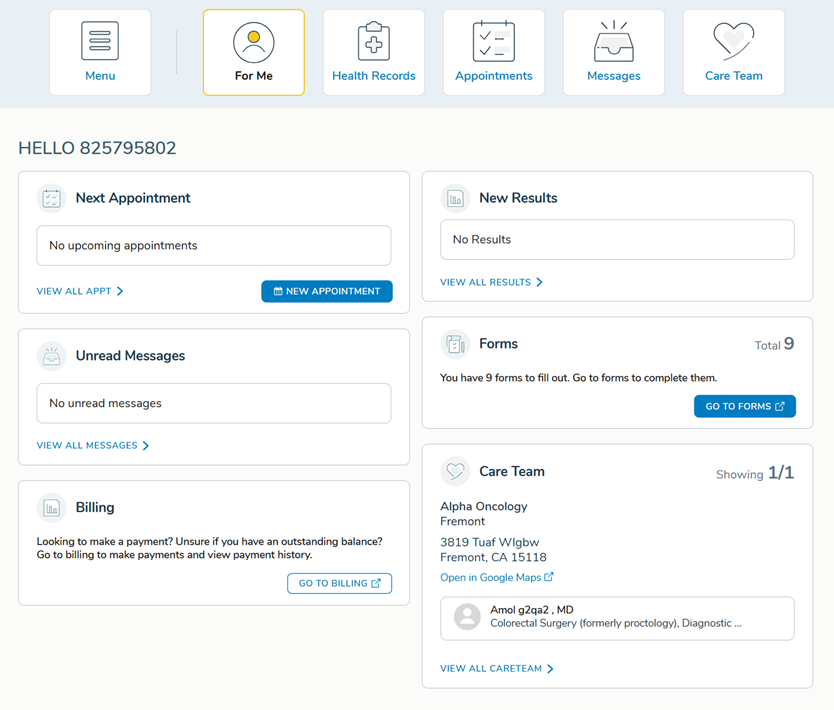
Layout and Widgets
The For Me page layout has been refreshed to make better use of space.
- The To Do widget has been updated to the latest design and resized so patients can more easily see other information on the page. The widget remains hidden from caregivers.
- All widgets now resize dynamically depending on the content. Cards will shrink when there is less information and expand when more information is available.
- Widgets will appear in a consistent order:
- Two-column layout:
- Left column: Appointments, Messages, Billing.
- Right column: Results, Forms, Care Team.
- One-column layout:
- Appointments, Results, Messages, Forms, Billing, Care Team.
- Two-column layout:
Forms Widget
New messages appear based on the patient’s outstanding forms:
- No forms: “You’re all caught up! You do not have any forms to fill out. Go to forms to view previously completed forms.”
- One form: “You have 1 form to fill out. Go to forms to complete it.”
- Multiple forms: “You have X forms to fill out. Go to forms to complete them.”
Messages Widget
The messages card is now titled Unread Messages.