
Enhancements to CCDA Export Copied
We’re expanding the CCDA exports to include more information from the patient chart. These updates improve the clarity and completeness of patient records.
New options when exporting a CCDA
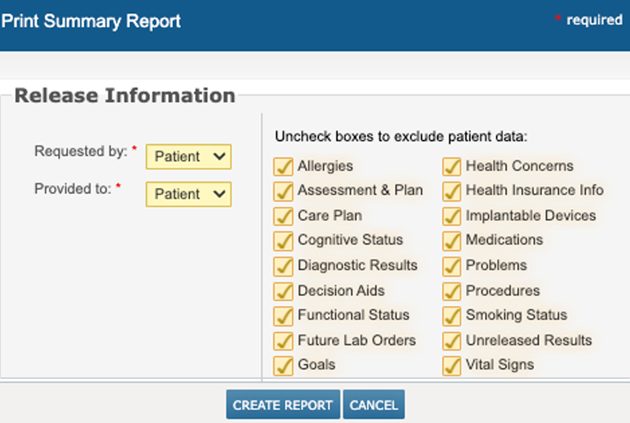
When exporting a CCDA, the Print Summary Report window now lists the following sections to include in the export:
- Assessment & Plan
- Goals
- Health Concerns
- Health Insurance Information
What’s new and updated in the CCDA
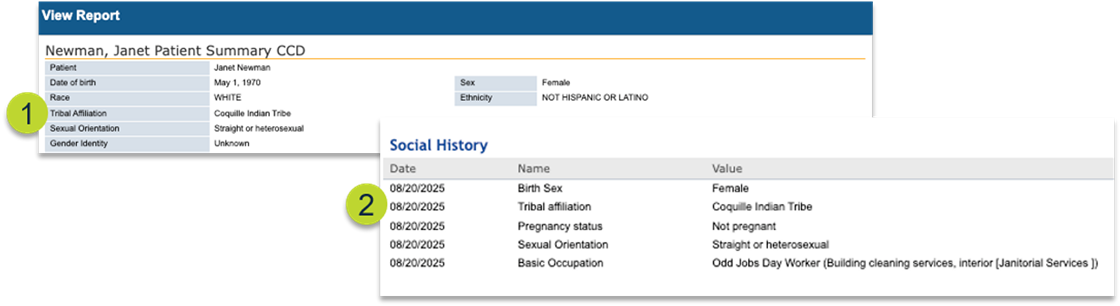
- Tribal Affiliation (callouts 1 and 2)
- A new field is available in the Demographics tab > Patient Information section.
- This information will also appear in the CCDA under both the Demographics and Social History sections.
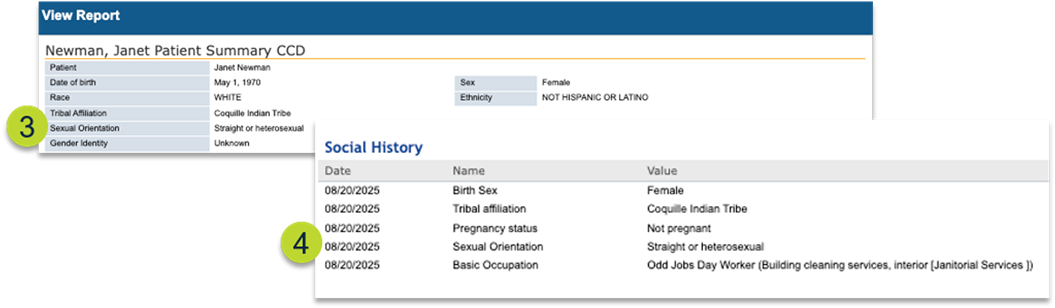
- Sexual Orientation (callouts 3 and 4)
- Existing field in the Demographics tab > Patient Information section. Now included in the CCDA under the Demographics and Social History sections.
- Existing field in the Demographics tab > Patient Information section. Now included in the CCDA under the Demographics and Social History sections.
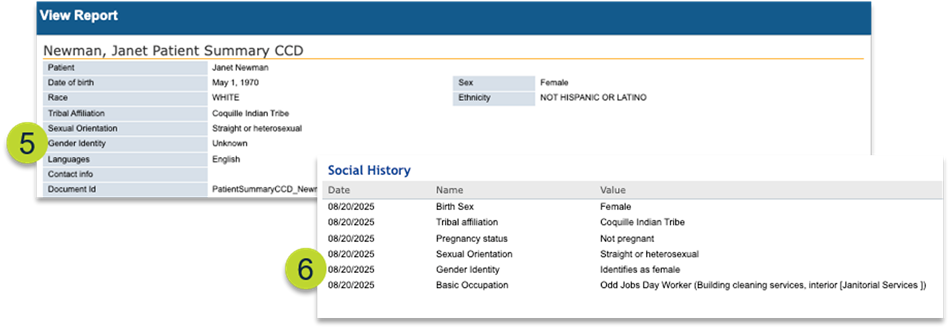
- Gender Identity (callout 5 and 6)
- The existing Gender Identity field in the Demographics tab > Patient Information section is now included in the CCDA under the Demographics and Social History sections.
- The existing Gender Identity field in the Demographics tab > Patient Information section is now included in the CCDA under the Demographics and Social History sections.
- Pregnancy Status (callout 7)
- Information recorded in the Clinical Profile > OB/GYN Hx > Pregnancy Details section, including the new From and To dates for pregnant patients, will now be included in the CCDA under the Social History section.
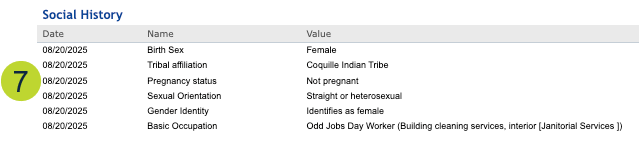
- Information recorded in the Clinical Profile > OB/GYN Hx > Pregnancy Details section, including the new From and To dates for pregnant patients, will now be included in the CCDA under the Social History section.
- Occupation and Occupation Industry (callouts 8 and 9)
- Occupation and industry information recorded in the Clinical Profile > Patient Hx > Social History section will display in the CCDA under the Demographics and Social History sections.
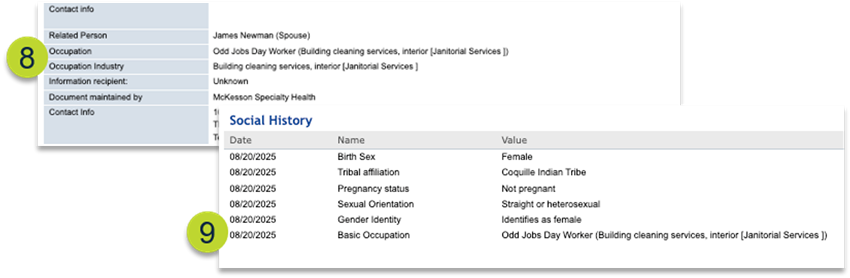
- Occupation and industry information recorded in the Clinical Profile > Patient Hx > Social History section will display in the CCDA under the Demographics and Social History sections.
- Care Team (callout 10)
- The CCDA export has been enhanced to include information from the new Additional Care Team Members field in the Demographics tab, including those who are not iKnowMed users.
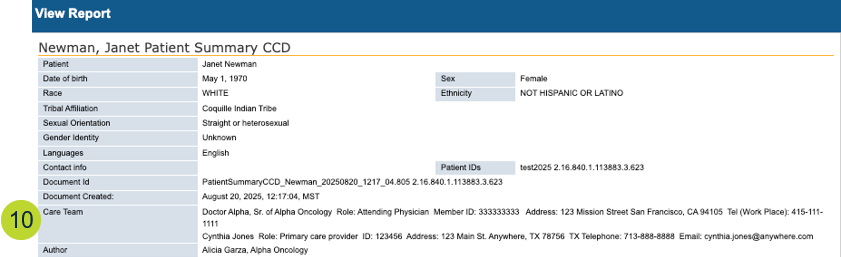
- The CCDA export has been enhanced to include information from the new Additional Care Team Members field in the Demographics tab, including those who are not iKnowMed users.
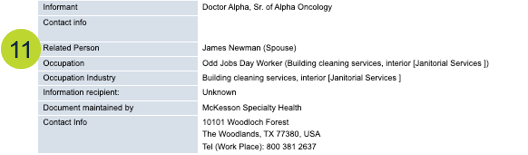
- Related Person (callout 11)
- Contacts/Next of Kin information recorded in the Demographics tab > Contacts section are now included in the CCDA under the Demographics section.
- Displays the person’s first and last name and their relationship to the patient.
- Fill Status and Indication for Medications (callouts 12-13)
- The Medications section of the CCDA now includes two new columns:
- Fill Status – shows the state of medication dispensation.
- Indication – shows what the medication was prescribed to treat.
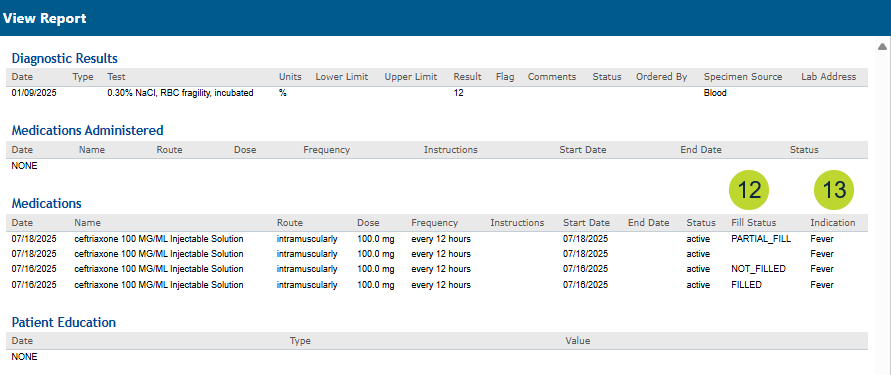
- The Medications section of the CCDA now includes two new columns:
- Disability Status (callout 14)
- Disability status questions and responses from the Demographics tab > Patient Information section will display in the CCDA under the Functional Status section.

- Disability status questions and responses from the Demographics tab > Patient Information section will display in the CCDA under the Functional Status section.
- Social Determinants of Health (callouts 15-17)
- Assessments, interventions, and goals from the Clinical Profile > Patient Hx > Social Determinants of Health tab will display in the CCDA under the Procedures section.
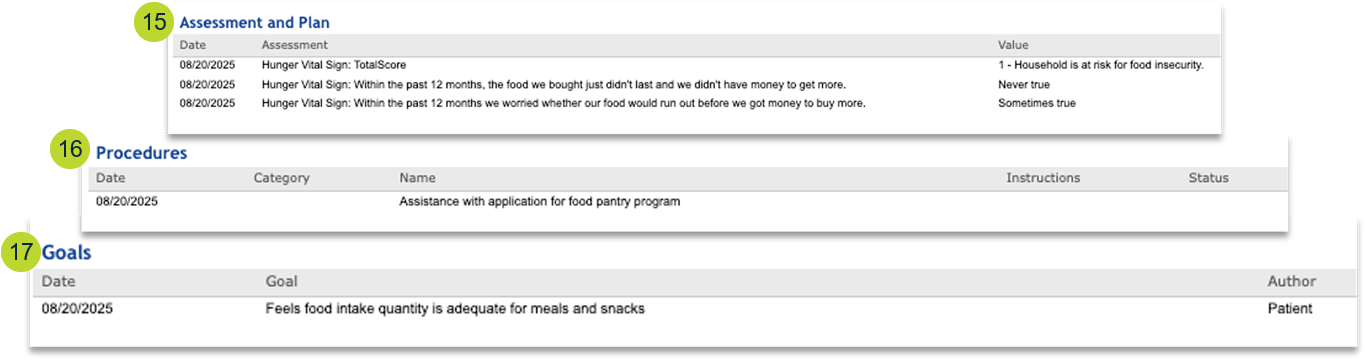
- Assessments, interventions, and goals from the Clinical Profile > Patient Hx > Social Determinants of Health tab will display in the CCDA under the Procedures section.
- Mental Status (callout 18)
- The CCDA Mental Status will include all possible statuses documented in the Clinical Profile > Observations > Add Cognitive Status feature, including the new Normal Memory/Cognition and Loss of Memory/Amnesia statuses.
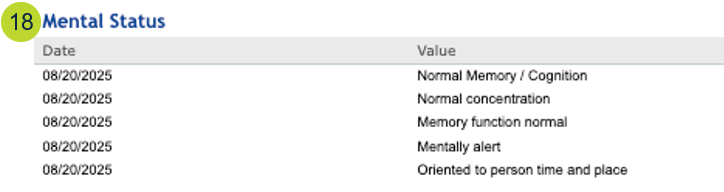
- The CCDA Mental Status will include all possible statuses documented in the Clinical Profile > Observations > Add Cognitive Status feature, including the new Normal Memory/Cognition and Loss of Memory/Amnesia statuses.
- Health Concerns (callouts 19 and 20)
- The CCDA Health Concerns section will include problems from the patient’s chart if the new Health Concerns box is checked in the Clinical Profile > Problems tab.
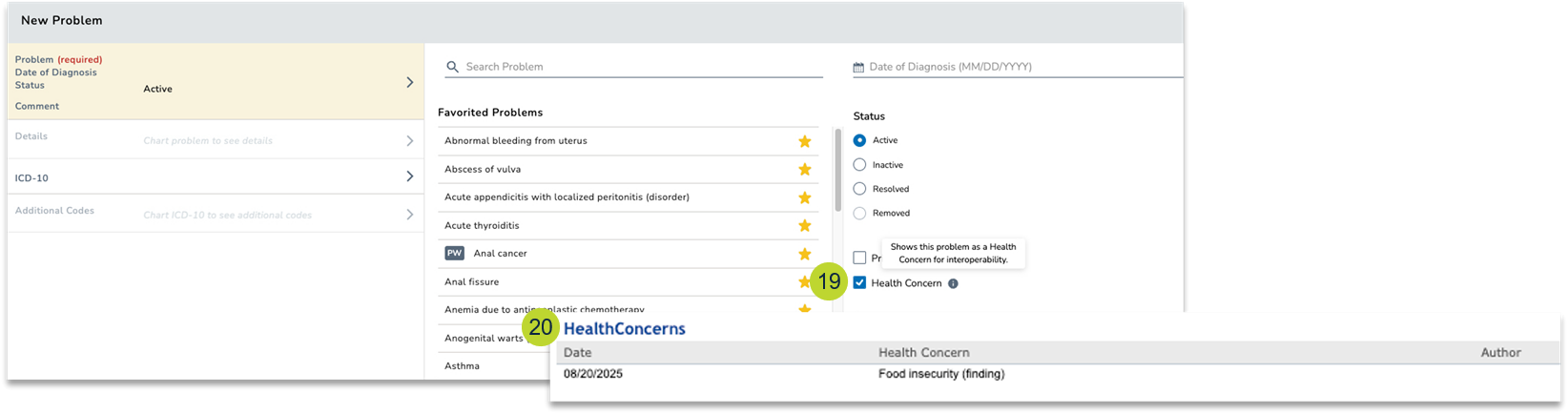
- The CCDA Health Concerns section will include problems from the patient’s chart if the new Health Concerns box is checked in the Clinical Profile > Problems tab.
- Health Insurance (callout 21)
- A new CCDA section will display patient insurance information recorded in the Demographics tab > Insurance section. This includes the new fields available in the Demographics tab for Member ID, Patient Relationship to Subscriber, Group Name, Group ID, Plan Name, and Plan ID.
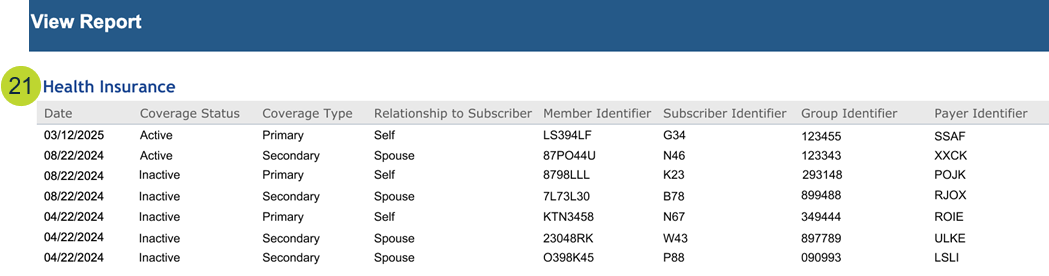
- A new CCDA section will display patient insurance information recorded in the Demographics tab > Insurance section. This includes the new fields available in the Demographics tab for Member ID, Patient Relationship to Subscriber, Group Name, Group ID, Plan Name, and Plan ID.